第一步:安装
使用包管理器 npm 或 yarn来安装 VueQuill。- npm install @vueup/vue-quill@latest --save
- # 或者
- yarn add @vueup/vue-quill@latest
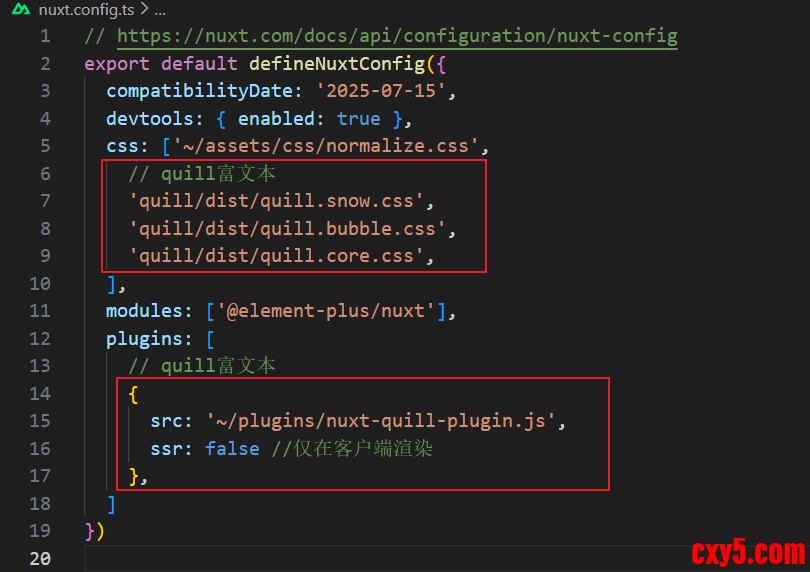
(1)打开nuxt.js的nuxt.config.ts配置文件,添加如下配置:- export default defineNuxtConfig({
- css: [
- // quill富文本
- 'quill/dist/quill.snow.css',
- 'quill/dist/quill.bubble.css',
- 'quill/dist/quill.core.css',
- ],
- plugins: [
- // quill富文本
- {
- src: '~/plugins/nuxt-quill-plugin.js',
- ssr: false //仅在客户端渲染
- },
- ]
- })
(2)在nuxt.js的app目录下新建plugins文件夹,在该文件夹下新建nuxt-quill-plugin.js文件,nuxt-quill-plugin.js文件内容如下:- import Vue from "vue";
- let VueQuillEditor;
- if (process.browser) {
- VueQuillEditor = require("vue-quill-editor/dist/ssr");
- }
- Vue.use(VueQuillEditor);
注意:编译器可能会报警告: WARN Plugin E:/xxxxx/app/plugins/nuxt-quill-plugin.js has no default export and will be ignored at build time. Add export default defineNuxtPlugin(() => {}) to your plugin. ,建议无视它。
第三步:封装MyEditor.vue富文本组件
在在nuxt.js的app目录下的components文件夹中新建MyEditor.vue文件,文件内容如下:- <template>
-
- <client-only>
- <QuillEditor theme="snow" :options="options" :content="content" contentType="html" />
- </client-only>
-
- </template>
注意:一定要用nuxt.js的包裹
第四步:引用组件
如下代码所示:- <template>
-
- <MyEditor :content="content" />
-
- </template>
来源:程序园用户自行投稿发布,如果侵权,请联系站长删除
免责声明:如果侵犯了您的权益,请联系站长,我们会及时删除侵权内容,谢谢合作! |


 提升卡
提升卡 置顶卡
置顶卡 沉默卡
沉默卡 喧嚣卡
喧嚣卡 变色卡
变色卡 千斤顶
千斤顶 照妖镜
照妖镜


