拯救“瞎眼”评论区 —— 麋鹿鲁哟主题 CSS 护眼补丁
首先声明并感谢 麋鹿鲁哟 博主,主题来自大神,整体体验很棒!
本文仅针对评论区阅读体验做小修小补,如果你也被字小、色浅、透明背景折磨到眼瞎,欢迎直接抄作业。
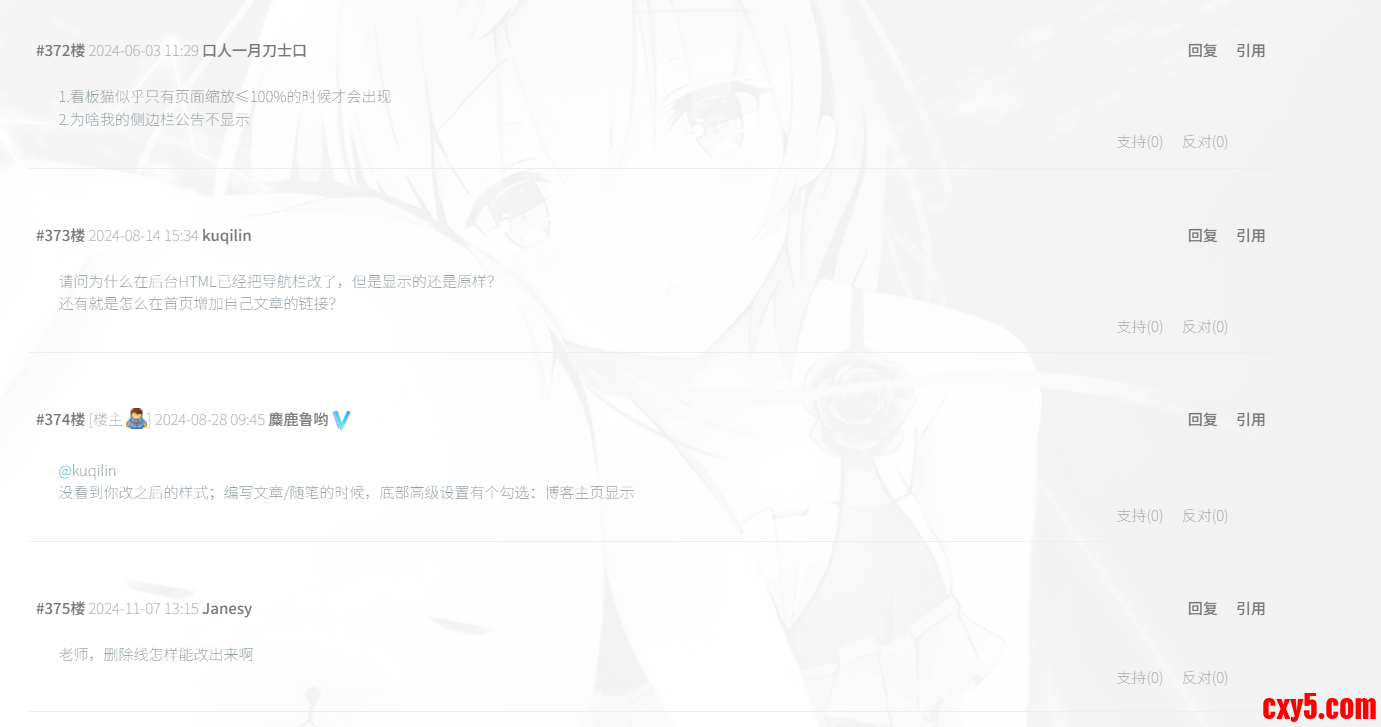
改造前后对比
改造前改造后背景全透、字细色浅、对比度低白底黑字、16 px、500 字重,头像保留一句话:牺牲少许“仙气”,换来“不瞎”。
快速上手(3 步)
- 进入博客园后台 → 设置 → 页面定制 CSS。
- 把滚动条拉到最底部。
- 复制下方代码 → 粘贴 → 保存 → Ctrl + F5 强刷生效。
护眼补丁代码
- /* ===== 评论区高对比度护眼版 ===== */
- .feedbackCon {
- color: #000 !important;
- background: #ffffff !important;
- border-radius: 8px;
- padding: 18px !important;
- margin-bottom: 18px !important;
- line-height: 1.8 !important;
- font-size: 16px !important;
- border: 3px solid #e2e8f0 !important;
- box-shadow: 0 4px 8px rgba(0,0,0,0.2) !important;
- font-weight: 500 !important;
- text-shadow: none !important;
- -webkit-font-smoothing: antialiased !important;
- -moz-osx-font-smoothing: grayscale !important;
- }
- .blog_comment_body {
- color: #000 !important;
- font-size: 16px !important;
- line-height: 1.8 !important;
- font-weight: 500 !important;
- letter-spacing: 0.2px !important;
- text-shadow: none !important;
- }
- /* 头像保留 */
- .comment-avatar {
- display: block !important;
- width: 48px !important;
- height: 48px !important;
- border: 1px solid #dcd6b3 !important;
- padding: 3px !important;
- border-radius: 50% !important;
- float: left !important;
- margin-right: 15px !important;
- transition: transform .5s;
- }
- .comment-avatar:hover {
- transform: rotateZ(360deg) !important;
- }
- /* 楼主张显 */
- .louzhu {
- background: linear-gradient(135deg, #ff6b6b, #ee5a24) !important;
- color: #fff !important;
- padding: 3px 10px !important;
- border-radius: 15px !important;
- font-size: 12px !important;
- font-weight: bold !important;
- }
需求改法字号再大font-size: 18px !important;字再黑color: #111 !important;圆角变小border-radius: 4px !important;结语
“仙气”与“护眼”不可兼得时,我选后者。
如果你也折腾出更好看的配色,欢迎来评论区反向种草!
再次感谢麋鹿鲁哟大神,让博客园也能拥有高颜值。
本文补丁仅作个人记录与分享,眼不瞎就是胜利 ✌️
[code][/code]
来源:程序园用户自行投稿发布,如果侵权,请联系站长删除
免责声明:如果侵犯了您的权益,请联系站长,我们会及时删除侵权内容,谢谢合作! |



 提升卡
提升卡 置顶卡
置顶卡 沉默卡
沉默卡 喧嚣卡
喧嚣卡 变色卡
变色卡 千斤顶
千斤顶 照妖镜
照妖镜


