1、打开Fiddler ,找到 规则(Rules)-> 自定义规则(Customize Rules) 打开 规则代码。- static function OnDone(oSession: Session) {
- if (oSession.uriContains("https://www.xxx.com/xxxx")==false)
- {
- return;
- }
- //检查Content-Type
- if (oSession.ResponseHeaders["Content-Type"]!=null || oSession.ResponseHeaders["content-type"]!=null)
- {
- //避免不规范标头
- var contentType=oSession.ResponseHeaders["Content-Type"];
- if (String.IsNullOrEmpty(contentType) )
- contentType=oSession.ResponseHeaders["content-type"];
-
- //判定请求是否图片
- if (contentType.Contains("image"))
- {
- //确定文件名(保存用)
- var fileName="";
- var fileIndex = oSession.RequestHeaders.RequestPath.LastIndexOf ("/");
- if (fileIndex>0)
- fileName = oSession.RequestHeaders.RequestPath.Substring (fileIndex+1);
-
- //如果文件名非法(名称含非法字符)
- if(fileName.IndexOf('?')>0 || fileName.IndexOf('&') )
- fileName=String.Empty;
- //输出日志(在Fiddler 主窗口,日志处输出)
- //FiddlerObject.log("Content-Type:"+ contentType +" RequestPath:"+oSession.RequestHeaders.RequestPath);
-
- //如果文件名为Null,自行创建一个文件名(Guid)
- if (String.IsNullOrEmpty( fileName))
- {
- fileName=Guid.NewGuid().ToString();
- var extName= contentType.Replace("image/","");
- fileName=fileName+"."+extName;
- }
-
- //太小的图片不要,比如站位图片(自行调节)
- if (oSession.ResponseBody.Length>100)
- {
- //指定保存位置
- var saveDir="D:\\fiddlerimage\";
- //不存在则创建文件夹
- if (!System.IO.Directory.Exists(saveDir))
- System.IO.Directory.CreateDirectory(saveDir);
-
- //保存响应流
- oSession.SaveResponseBody(saveDir+fileName);
- //写日志
- FiddlerObject.log("[文件保存]:"+fileName)
- }
- }
- }
- }
-
Fiddler一直提示The system proxy was changed,click to reenable fiddler capture
解决办法:进入到Fiddler-->Rules-->Customize Rules</p>1.在main()方法上方添加:
static function DoReattach(o: Object, ea: EventArgs)
{
ScheduledTasks.ScheduleWork("reattach", 1000, innerReattach);
}
static function innerReattach()
{
FiddlerApplication.UI.actAttachProxy();
}
static function OnRetire()
{
FiddlerApplication.oProxy.remove_DetachedUnexpectedly(DoReattach);
}
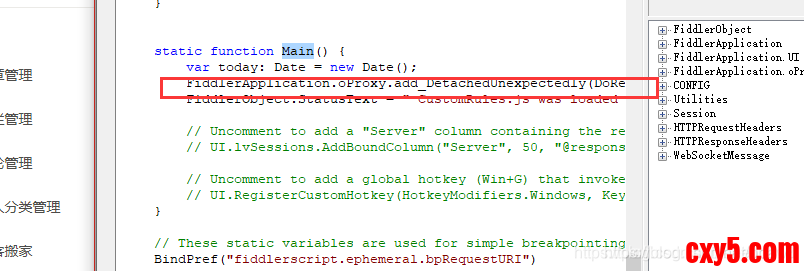
2.在main()方法中添加:
FiddlerApplication.oProxy.add_DetachedUnexpectedly(DoReattach);
来源:程序园用户自行投稿发布,如果侵权,请联系站长删除
免责声明:如果侵犯了您的权益,请联系站长,我们会及时删除侵权内容,谢谢合作! |


 提升卡
提升卡 置顶卡
置顶卡 沉默卡
沉默卡 喧嚣卡
喧嚣卡 变色卡
变色卡 千斤顶
千斤顶 照妖镜
照妖镜


