嗨~ 大家好,我是码农刚子。本文将深入探讨Blazor中的高级组件开发技术,包括渲染片段、动态组件、错误边界和虚拟化组件,帮助您构建更强大、更灵活的Blazor应用。
1. 渲染片段(RenderFragment)
1.1 基本概念
RenderFragment是Blazor中用于动态渲染UI内容的核心概念,它允许组件接收并渲染来自父组件的标记内容。
1.2 基础用法
-
- @Title
-
-
- @ChildContent
-
-
- @FooterContent
-
- @code {
- [Parameter]
- public string Title { get; set; } = "Default Title";
- [Parameter]
- public RenderFragment? ChildContent { get; set; }
- [Parameter]
- public RenderFragment? FooterContent { get; set; }
- }
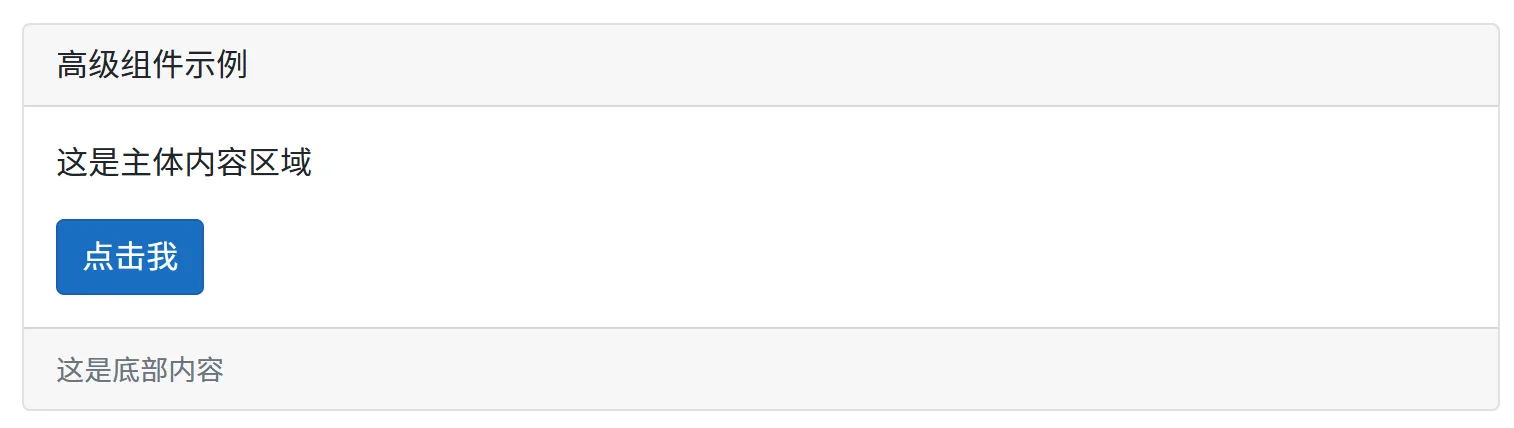
- @page "/advanced/component"
- <ChildComponent Title="高级组件示例">
- <ChildContent>
- <p>这是主体内容区域</p>
- <button >点击我</button>
- </ChildContent>
- <FooterContent>
- <small >这是底部内容</small>
- </FooterContent>
- </ChildComponent>
1.3 带参数的RenderFragment
- <h3>@Title</h3>
- @foreach (var item in Items)
- {
- @ItemTemplate(item)
- }
- @code {
- [Parameter]
- public string Title { get; set; } = "数据列表";
- [Parameter]
- public IEnumerable<object>? Items { get; set; }
- [Parameter]
- public RenderFragment<object>? ItemTemplate { get; set; }
- }
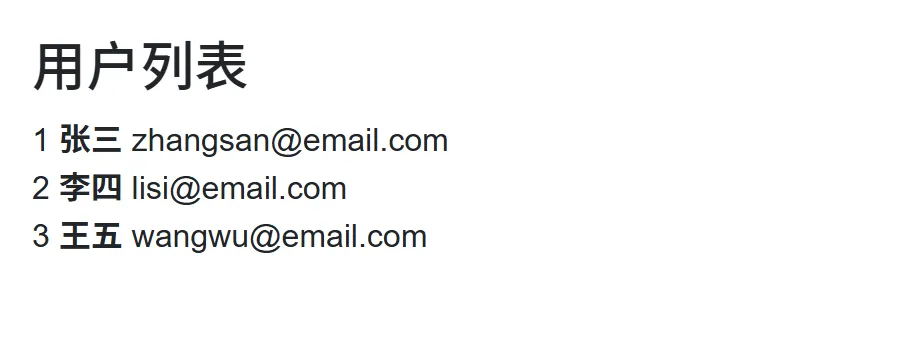
- @page "/advanced/component/datalist"
- @using System.ComponentModel.DataAnnotations
- <DataListComponent Title="用户列表"
- Items="users">
- <ItemTemplate>
-
- @((context as User)?.Id)
- <strong>@((context as User)?.Name)</strong>
- @((context as User)?.Email)
-
- </ItemTemplate>
- </DataListComponent>
- @code {
- private List<User> users = new();
- protected override void OnInitialized()
- {
- users = new List<User>
- {
- new User { Id = 1, Name = "张三", Email = "zhangsan@email.com" },
- new User { Id = 2, Name = "李四", Email = "lisi@email.com" },
- new User { Id = 3, Name = "王五", Email = "wangwu@email.com" }
- };
- }
- public class User
- {
- public int Id { get; set; }
- [Required]
- public string Name { get; set; } = string.Empty;
- [EmailAddress]
- public string Email { get; set; } = string.Empty;
- }
- }
2. 动态组件
2.1 使用RenderTreeBuilder动态构建组件
- @using Microsoft.AspNetCore.Components.Rendering
- @foreach (var componentType in ComponentTypes)
- {
-
- @{
- var index = ComponentTypes.IndexOf(componentType);
- BuildComponent(index);
- }
-
- }
- @code {
- [Parameter]
- public List<Type> ComponentTypes { get; set; } = new();
- [Parameter]
- public Dictionary<Type, Dictionary<string, object>> ComponentParameters { get; set; } = new();
- private void BuildComponent(int sequence)
- {
- var componentType = ComponentTypes[sequence];
- var parameters = ComponentParameters.ContainsKey(componentType)
- ? ComponentParameters[componentType]
- : new Dictionary<string, object>();
- }
- protected override void BuildRenderTree(RenderTreeBuilder builder)
- {
- for (int i = 0; i < ComponentTypes.Count; i++)
- {
- builder.OpenElement(i * 2, "div");
- builder.AddAttribute(i * 2 + 1, "class", "dynamic-component");
-
- builder.OpenComponent(i * 2 + 2, ComponentTypes[i]);
-
- if (ComponentParameters.ContainsKey(ComponentTypes[i]))
- {
- foreach (var param in ComponentParameters[ComponentTypes[i]])
- {
- builder.AddAttribute(i * 2 + 3, param.Key, param.Value);
- }
- }
-
- builder.CloseComponent();
- builder.CloseElement();
- }
- }
- }
- @using Microsoft.AspNetCore.Components
- @if (CurrentComponentType != null)
- {
- <DynamicComponent Type="CurrentComponentType" Parameters="CurrentParameters" />
- }
- else
- {
-
- <p>请选择要显示的组件</p>
-
- }
- <button @onclick="() => ShowComponent(typeof(Counter))">
- 显示计数器
- </button>
- <button @onclick="() => ShowComponent(typeof(FetchData))">
- 显示数据获取
- </button>
- <button @onclick="() => ShowComponent(typeof(TodoList))">
- 显示待办事项
- </button>
- @code {
- private Type? CurrentComponentType { get; set; }
- private Dictionary<string, object> CurrentParameters { get; set; } = new();
- private void ShowComponent(Type componentType)
- {
- CurrentComponentType = componentType;
- CurrentParameters = GetParametersForComponent(componentType);
- StateHasChanged();
- }
- private Dictionary<string, object> GetParametersForComponent(Type componentType)
- {
- var parameters = new Dictionary<string, object>();
- if (componentType == typeof(Counter))
- {
- parameters["IncrementAmount"] = 5;
- }
- else if (componentType == typeof(TodoList))
- {
- parameters["Title"] = "动态待办事项";
- }
- return parameters;
- }
- }
- @using Microsoft.AspNetCore.Components
- <DynamicComponent
- Type="ResolveComponentType()"
- Parameters="ResolveParameters()" />
- @code {
- [Parameter]
- public string ComponentName { get; set; } = string.Empty;
- [Parameter]
- public Dictionary<string, object>? InputParameters { get; set; }
- [Parameter]
- public EventCallback<Dictionary<string, object>> OnParametersResolved { get; set; }
- private Type ResolveComponentType()
- {
- return ComponentName switch
- {
- "Counter" => typeof(Counter),
- "TodoList" => typeof(TodoList),
- "FetchData" => typeof(FetchData),
- "Weather" => typeof(FetchData), // 别名
- _ => typeof(NotFoundComponent)
- };
- }
- private Dictionary<string, object> ResolveParameters()
- {
- var parameters = InputParameters ?? new Dictionary<string, object>();
- // 添加默认参数
- if (ComponentName == "Counter" && !parameters.ContainsKey("IncrementAmount"))
- {
- parameters["IncrementAmount"] = 1;
- }
- // 通知参数解析完成
- OnParametersResolved.InvokeAsync(parameters);
- return parameters;
- }
- }
3.1 基础错误边界组件
- @using Microsoft.AspNetCore.Components
- <CascadingValue Value="this">
- @if (!hasError)
- {
- @ChildContent
- }
- else if (ErrorContent != null)
- {
- @ErrorContent
- }
- else
- {
-
- <h4>出现了错误</h4>
- <p>@currentException?.Message</p>
- <button @onclick="Recover">
- 重试
- </button>
-
- }
- </CascadingValue>
- @code {
- [Parameter]
- public RenderFragment? ChildContent { get; set; }
- [Parameter]
- public RenderFragment<Exception>? ErrorContent { get; set; }
- [Parameter]
- public bool RecoverOnRender { get; set; } = true;
- private bool hasError;
- private Exception? currentException;
- public void Recover()
- {
- hasError = false;
- currentException = null;
- StateHasChanged();
- }
- protected override void OnParametersSet()
- {
- if (RecoverOnRender)
- {
- hasError = false;
- currentException = null;
- }
- }
- public async Task CatchAsync(Func<Task> action)
- {
- try
- {
- await action();
- hasError = false;
- currentException = null;
- }
- catch (Exception ex)
- {
- hasError = true;
- currentException = ex;
- StateHasChanged();
- }
- }
- }
- @using Microsoft.AspNetCore.Components
- @inject ILogger<EnhancedErrorBoundary> Logger
- <CascadingValue Value="this">
- @if (currentState == ErrorState.Normal)
- {
- @ChildContent
- }
- else
- {
-
-
- <i ></i>
- <h4>@GetErrorMessage()</h4>
-
-
- @if (ShowExceptionDetails)
- {
-
- <p><strong>错误类型:</strong> @currentException?.GetType().Name</p>
- <p><strong>错误信息:</strong> @currentException?.Message</p>
-
- @if (ShowStackTrace)
- {
- <details>
- <summary>堆栈跟踪</summary>
- <pre>@currentException?.StackTrace</pre>
- </details>
- }
-
- }
-
-
- <button @onclick="Recover">
- <i ></i> 重试
- </button>
-
- @if (ShowReportButton)
- {
- <button @onclick="ReportError">
- <i ></i> 报告错误
- </button>
- }
-
- <button @onclick="ToggleDetails">
- <i ></i>
- @(ShowExceptionDetails ? "隐藏" : "显示")详情
- </button>
-
-
- }
- </CascadingValue>
- @code {
- [Parameter]
- public RenderFragment? ChildContent { get; set; }
- [Parameter]
- public bool ShowExceptionDetails { get; set; } = false;
- [Parameter]
- public bool ShowStackTrace { get; set; } = false;
- [Parameter]
- public bool ShowReportButton { get; set; } = true;
- [Parameter]
- public EventCallback<Exception> OnError { get; set; }
- private ErrorState currentState = ErrorState.Normal;
- private Exception? currentException;
- private bool ShowExceptionDetailsLocal = false;
- protected override async Task OnErrorAsync(Exception exception)
- {
- currentState = ErrorState.Error;
- currentException = exception;
-
- Logger.LogError(exception, "组件渲染时发生错误");
-
- await OnError.InvokeAsync(exception);
- await base.OnErrorAsync(exception);
- }
- private void Recover()
- {
- currentState = ErrorState.Normal;
- currentException = null;
- ShowExceptionDetailsLocal = false;
- StateHasChanged();
- }
- private void ReportError()
- {
- // 这里可以实现错误报告逻辑
- Logger.LogError("用户报告错误: {Exception}", currentException);
- // 可以发送到错误监控服务
- }
- private void ToggleDetails()
- {
- ShowExceptionDetailsLocal = !ShowExceptionDetailsLocal;
- }
- private string GetErrorContainerClass() => currentState switch
- {
- ErrorState.Error => "error-container alert alert-danger",
- ErrorState.Warning => "error-container alert alert-warning",
- _ => "error-container"
- };
- private string GetErrorIcon() => currentState switch
- {
- ErrorState.Error => "fas fa-exclamation-triangle",
- ErrorState.Warning => "fas fa-exclamation-circle",
- _ => "fas fa-info-circle"
- };
- private string GetErrorMessage() => currentState switch
- {
- ErrorState.Error => "发生了意外错误",
- ErrorState.Warning => "操作未完全成功",
- _ => "未知状态"
- };
- private enum ErrorState
- {
- Normal,
- Warning,
- Error
- }
- }
- <h2>错误边界使用示例</h2>
-
- <EnhancedErrorBoundary
- ShowExceptionDetails="true"
- OnError="OnErrorOccurred">
-
-
- <h3>安全组件区域</h3>
-
- <UnstableComponent />
-
-
-
- <p>这个区域受到错误边界保护</p>
- <button @onclick="SafeOperation">
- 安全操作
- </button>
-
-
-
- </EnhancedErrorBoundary>
-
-
- <h3>外部内容(不受错误边界保护)</h3>
- <p>这个区域的内容不会受到内部组件错误的影响</p>
-
- @code {
- private void OnErrorOccurred(Exception ex)
- {
- // 处理错误,可以发送到监控系统
- Console.WriteLine($"捕获到错误: {ex.Message}");
- }
-
- private void SafeOperation()
- {
- // 安全操作不会抛出异常
- }
- }
4.1 基础虚拟化列表
- @using Microsoft.AspNetCore.Components.Web.Virtualization
- <Virtualize Items="Items" Context="item" OverscanCount="10">
-
-
- <h5>@item.Name</h5>
- <p>@item.Description</p>
- <small >ID: @item.Id</small>
-
-
- </Virtualize>
- @code {
- [Parameter]
- public List<DataItem> Items { get; set; } = new();
- public class DataItem
- {
- public int Id { get; set; }
- public string Name { get; set; } = string.Empty;
- public string Description { get; set; } = string.Empty;
- public DateTime CreatedAt { get; set; }
- }
- }
- @using Microsoft.AspNetCore.Components.Web.Virtualization
-
- <h4>@Title</h4>
-
- 显示 <strong>@visibleItemCount</strong> 个项目
- (总共 <strong>@totalSize</strong> 个)
-
-
-
- <Virtualize ItemsProvider="LoadItems" Context="item"
- OverscanCount="5" @ref="virtualizeRef">
-
- #@item.Index
-
- <h6>@item.Name</h6>
- <p>@item.Description</p>
-
- @item.Category
- <small>@item.CreatedAt.ToString("yyyy-MM-dd HH:mm")</small>
-
-
-
- <button
- @onclick="() => OnItemClick(item)">
- 查看
- </button>
-
-
-
- <Placeholder>
-
-
-
-
-
-
- </Placeholder>
- </Virtualize>
-
-
- <button @onclick="RefreshData">
- <i ></i> 刷新
- </button>
-
- @if (isLoading)
- {
- <i ></i>
- 加载中...
- }
-
-
- @code {
- [Parameter]
- public string Title { get; set; } = "虚拟化列表";
- [Parameter]
- public EventCallback<VirtualItem> OnItemClick { get; set; }
- private Virtualize<VirtualItem>? virtualizeRef;
- private int totalSize = 1000;
- private int visibleItemCount;
- private bool isLoading;
- private async ValueTask<ItemsProviderResult<VirtualItem>> LoadItems(
- ItemsProviderRequest request)
- {
- isLoading = true;
- StateHasChanged();
- try
- {
- // 模拟网络延迟
- await Task.Delay(100);
- var totalItems = await GetTotalItemCountAsync();
- var items = await GetItemsAsync(request.StartIndex, request.Count);
- visibleItemCount = items.Count;
- return new ItemsProviderResult<VirtualItem>(items, totalItems);
- }
- finally
- {
- isLoading = false;
- StateHasChanged();
- }
- }
- private async Task<int> GetTotalItemCountAsync()
- {
- // 模拟从API获取总数
- await Task.Delay(50);
- return totalSize;
- }
- private async Task<List<VirtualItem>> GetItemsAsync(int startIndex, int count)
- {
- // 模拟从API获取数据
- await Task.Delay(100);
- var items = new List<VirtualItem>();
- for (int i = 0; i < count && startIndex + i < totalSize; i++)
- {
- var index = startIndex + i;
- items.Add(new VirtualItem
- {
- Index = index,
- Id = Guid.NewGuid(),
- Name = $"项目 {index + 1}",
- Description = $"这是第 {index + 1} 个项目的描述信息",
- Category = GetCategory(index),
- CreatedAt = DateTime.Now.AddMinutes(-index),
- IsSpecial = index % 7 == 0
- });
- }
- return items;
- }
- private string GetCategory(int index)
- {
- var categories = new[] { "技术", "商业", "艺术", "科学", "体育" };
- return categories[index % categories.Length];
- }
- private async void RefreshData()
- {
- // 刷新虚拟化组件
- if (virtualizeRef != null)
- {
- await virtualizeRef.RefreshDataAsync();
- }
- }
- public class VirtualItem
- {
- public int Index { get; set; }
- public Guid Id { get; set; }
- public string Name { get; set; } = string.Empty;
- public string Description { get; set; } = string.Empty;
- public string Category { get; set; } = string.Empty;
- public DateTime CreatedAt { get; set; }
- public bool IsSpecial { get; set; }
- }
- }
- @using Microsoft.AspNetCore.Components.Web.Virtualization
-
- <h4>@Title</h4>
-
- <label>
- 列数:
- <input type="number" @bind="columns" @bind:event="oninput"
- min="1" max="6" />
- </label>
- <label>
- 项目高度:
- <input type="number" @bind="itemHeight" @bind:event="oninput"
- min="50" max="300" />
- </label>
-
-
-
- <Virtualize ItemsProvider="LoadGridItems" Context="item"
- OverscanCount="8" @ref="virtualizeRef">
-
-
-
- #@item.Index
- @item.Category
-
- <h6 >@item.Title</h6>
- <p >@item.Description</p>
-
-
- <i ></i> @item.Views
-
-
- <i ></i> @item.Likes
-
-
-
- <small >
- @item.CreatedAt.ToString("MM/dd/yyyy")
- </small>
- <button
- @onclick="() => OnItemAction(item)">
- <i ></i>
- </button>
-
-
-
- </Virtualize>
-
- @code {
- [Parameter]
- public string Title { get; set; } = "虚拟化网格";
- [Parameter]
- public EventCallback<GridItem> OnItemAction { get; set; }
- private Virtualize<GridItem>? virtualizeRef;
- private int totalSize = 500;
- private int columns = 3;
- private int itemHeight = 150;
- protected override void OnParametersSet()
- {
- // 当列数改变时更新网格布局
- UpdateGridLayout();
- }
- private void UpdateGridLayout()
- {
- // 动态更新CSS网格模板
- var style = $@"
- .virtualized-grid {{
- grid-template-columns: repeat({columns}, 1fr);
- }}
- ";
- // 在实际应用中,您可能需要使用JavaScript互操作来动态更新样式
- }
- private async ValueTask<ItemsProviderResult<GridItem>> LoadGridItems(
- ItemsProviderRequest request)
- {
- // 模拟异步数据加载
- await Task.Delay(150);
- var totalItems = await GetTotalGridItemCountAsync();
- var items = await GetGridItemsAsync(request.StartIndex, request.Count);
- return new ItemsProviderResult<GridItem>(items, totalItems);
- }
- private async Task<int> GetTotalGridItemCountAsync()
- {
- await Task.Delay(50);
- return totalSize;
- }
- private async Task<List<GridItem>> GetGridItemsAsync(int startIndex, int count)
- {
- await Task.Delay(100);
- var items = new List<GridItem>();
- var categories = new[] { "设计", "开发", "营销", "内容", "支持" };
- for (int i = 0; i < count && startIndex + i < totalSize; i++)
- {
- var index = startIndex + i;
- var random = new Random(index);
- items.Add(new GridItem
- {
- Index = index,
- Id = Guid.NewGuid(),
- Title = $"网格项目 {index + 1}",
- Description = GenerateDescription(index),
- Category = categories[random.Next(categories.Length)],
- Views = random.Next(1000, 10000),
- Likes = random.Next(10, 500),
- CreatedAt = DateTime.Now.AddDays(-random.Next(365)),
- IsFeatured = index % 11 == 0
- });
- }
- return items;
- }
- private string GenerateDescription(int index)
- {
- var descriptions = new[]
- {
- "这是一个非常有趣的项目,展示了最新的技术趋势。",
- "创新性的解决方案,解决了长期存在的问题。",
- "用户友好的设计,提供了出色的用户体验。",
- "高性能实现,优化了资源使用和响应时间。",
- "跨平台兼容,支持多种设备和浏览器。"
- };
- return descriptions[index % descriptions.Length];
- }
- public class GridItem
- {
- public int Index { get; set; }
- public Guid Id { get; set; }
- public string Title { get; set; } = string.Empty;
- public string Description { get; set; } = string.Empty;
- public string Category { get; set; } = string.Empty;
- public int Views { get; set; }
- public int Likes { get; set; }
- public DateTime CreatedAt { get; set; }
- public bool IsFeatured { get; set; }
- }
- }
本文详细介绍了Blazor中的四个高级组件开发特性:
- 渲染片段(RenderFragment):提供了灵活的组件内容注入机制
- 动态组件:支持运行时组件类型解析和渲染
- 错误边界:优雅地处理组件树中的异常
- 虚拟化组件:优化大数据集的性能表现
这些高级特性能够帮助您构建更加健壮、灵活和高性能的Blazor应用程序。在实际开发中,建议根据具体需求选择合适的模式,并注意性能优化和错误处理。
以上就是《ASP.NET Core Blazor进阶1:高级组件开发》的全部内容,希望你有所收获。关注、点赞,持续分享。
来源:程序园用户自行投稿发布,如果侵权,请联系站长删除
免责声明:如果侵犯了您的权益,请联系站长,我们会及时删除侵权内容,谢谢合作! |


 提升卡
提升卡 置顶卡
置顶卡 沉默卡
沉默卡 喧嚣卡
喧嚣卡 变色卡
变色卡 千斤顶
千斤顶 照妖镜
照妖镜


