摘要:为解决常规自走棋游戏配置灵活度低且难以在局域网跨平台联机的问题,本文基于Babylon.js(以下简称bbl)和websocket(简称ws)技术实现了一个网页端多人自走棋游戏原型。该原型实现了棋盘地形设计、简单的棋子角色设计、自走棋操作UI、双方对抗逻辑、角色生命周期管理和基于websoket的局域网多人互联。项目达成了最初设计目标,且前端代码以原生方式编写易于调试和扩展,编程者可以此原型为基础编写更复杂的多人自走棋类游戏。
1、程序运行效果
视频地址:https://www.bilibili.com/video/BV1tvPfzMETk
画面上方为红蓝双方的控制页面,下方为裁判页面,红蓝双方分别可通过自己的页面向场景中放置单位,裁判页面负责进行所有逻辑计算并向红蓝双方同步状态,ws服务器需运行在window PC上,前端页面可通过浏览器运行在PC或移动设备上。
页面默认为rts控制方式,鼠标左键拖动地图,滚轮缩放视角范围,左键在卡组中选取单位,右键放置。按o键可切换为自由相机进行场景调试(鼠标拖动视角,上下左右控制移动),按i键可恢复为rts控制方式。
1.1代码下载
该项目基于MIT协议开源,可通过以下链接下载全部运行环境和代码:
链接: https://yun.139.com/shareweb/#/w/i/2u8ooDGV0gA4g 提取码:wrkg
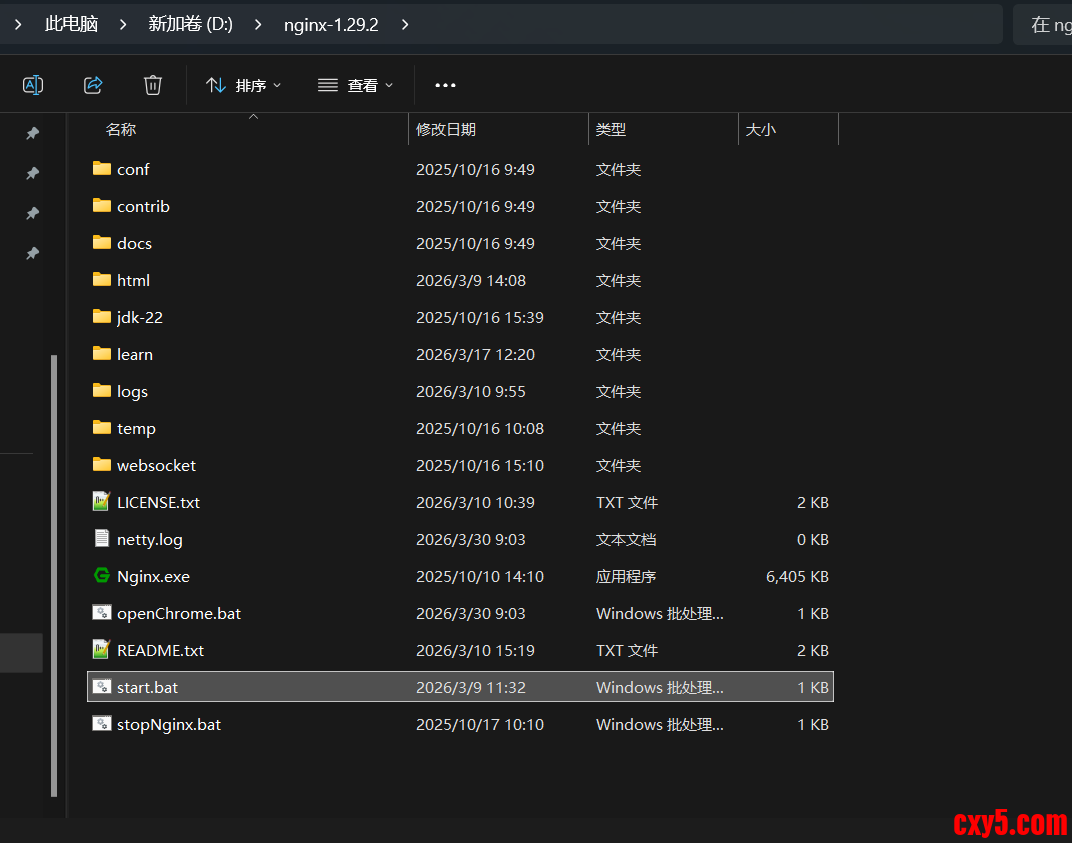
解压后目录如下图:
主目录由nginx服务器改造而成,其中html下为前端代码与资源,jdk-22为java运行库,websocket下为以java语言编写的ws服务器,start.bat为一键启动脚本。
1.2启动运行环境
start.bat脚本内容如下:- 1 rem 关闭已有的nginx
- 2 nginx -s stop
- 3 rem 设置环境变量
- 4 set JAVA_HOME=jdk-22
- 5 set JRE_HOME=%JAVA_HOME%
- 6 set CLASSPATH=.;%JAVA_HOME%\lib
- 7 set Path=%JAVA_HOME%\bin;%JAVA_HOME%\lib
- 8 rem 启动netty服务
- 9 start "startWS" java -jar websocket\target\websocket-0.0.1.jar 192.168.43.220-2323-80-routeWH.html >netty.log
- 10 timeout 5
ws服务器是一个springboot+Netty框架程序,其系统架构为:

其入口方法FSPApplication如下:- 1 @SpringBootApplication
- 2 public class FSPApplication implements CommandLineRunner{
- 3 @Autowired
- 4 private ServerBootStrap ws;
- 5
- 6 public static void main(String[] args) {//args是java命令参数??
- 7 SpringApplication.run(FSPApplication.class, args);
- 8 }
- 9 @Override
- 10 public void run(String... args) throws Exception {
- 11
- 12 String str_p=args[0];
- 13 String[] arr_p=str_p.split("-");
- 14 NettyConfig.WS_HOST=arr_p[0];//参数配置中的IP
- 15 NettyConfig.WS_HOST2=GetLocalIP();//自动获取的IP
- 16
- 17 if(!arr_p[1].equals(""))
- 18 {
- 19 NettyConfig.WS_PORT=Integer.parseInt(arr_p[1]);
- 20 }
- 21 if(!arr_p[2].equals(""))
- 22 {
- 23 NettyConfig.HTTP_PORT=Integer.parseInt(arr_p[2]);
- 24 }
- 25 if(!arr_p[3].equals(""))
- 26 {
- 27 NettyConfig.WS_ROUTE=arr_p[3];//自定义的网页URL
- 28 }
- 29 InetSocketAddress address;
- 30 ChannelFuture future;
- 31 try{//启动ws服务
- 32 address = new InetSocketAddress(NettyConfig.WS_HOST, NettyConfig.WS_PORT);
- 33 future = ws.start(address);
- 34 setConfigFile(NettyConfig.WS_HOST,NettyConfig.HTTP_PORT,NettyConfig.WS_PORT,NettyConfig.WS_ROUTE);
- 35 System.out.print("Netty开始监听:"+NettyConfig.WS_HOST+":"+NettyConfig.WS_PORT);
- 36 }catch(Exception e)
- 37 {//如参数配置的IP启动失败,则使用自动获取的IP启动
- 38 e.printStackTrace();
- 39 address = new InetSocketAddress(NettyConfig.WS_HOST2, NettyConfig.WS_PORT);
- 40 future = ws.start(address);
- 41 setConfigFile(NettyConfig.WS_HOST2,NettyConfig.HTTP_PORT,NettyConfig.WS_PORT,NettyConfig.WS_ROUTE);
- 42 System.out.print("Netty开始监听:"+NettyConfig.WS_HOST2+":"+NettyConfig.WS_PORT);
- 43 }
- 44
- 45 //在强制关闭java命令行窗口时这一钩子方法没有生效!!
- 46 //一种可能的方法是,打开两个java cmd窗口,只要有其中一个被关闭,则主动关闭所有
- 47 Runtime.getRuntime().addShutdownHook(new Thread(){
- 48 @Override
- 49 public void run() {
- 50 ws.destroy();
- 51 //在这里顺便关闭nginx
- 52 String path_root=System.getProperty("user.dir");//java命令运行目录
- 53 String cmd="cd "+path_root+";nginx -s stop";
- 54 Runtime runtime = Runtime.getRuntime();
- 55 Process proce = null;
- 56 try{
- 57 proce = runtime.exec(cmd);
- 58 }catch (Exception e) {
- 59 e.printStackTrace();
- 60 }
- 61 }
- 62 });
- 63 future.channel().closeFuture().syncUninterruptibly();
- 64 }
- 65 public static void setConfigFile(String localIP,int httpPort,int wsPort,String wsRoute)
- 66 {//根据java的配置情况,去修改nginx和前端的配置文件!!!!
- 67 //要确保配置修改完毕后才启动nginx!
- 68 FileOutputStream outSTr=null;
- 69 BufferedOutputStream Buff=null;
- 70 FileOutputStream outSTr2=null;
- 71 BufferedOutputStream Buff2=null;
- 72 FileOutputStream outSTr3=null;
- 73 BufferedOutputStream Buff3=null;
- 74 try
- 75 {
- 76 String path_root=System.getProperty("user.dir");//java命令运行目录
- 77 //修改前端项目的配置文件
- 78 String path_c_html=path_root+"/html/config.js";
- 79 String str_c_html="var localIP=""+localIP+"";\n" +
- 80 "var wsPort=""+wsPort+"";\n" +
- 81 "var httpPort=""+httpPort+"";";
- 82 File file_c_html=new File(path_c_html);
- 83 outSTr=new FileOutputStream(file_c_html);
- 84 Buff=new BufferedOutputStream(outSTr);
- 85 StringBuffer write =new StringBuffer();
- 86 write.append(str_c_html);
- 87 Buff.write(write.toString().getBytes("UTF-8"));
- 88 Buff.flush();
- 89 outSTr.close();
- 90 Buff.close();
- 91 //修改nginx的配置文件
- 92 String path_c_nginx=path_root+"/conf/nginx.conf";
- 93 String str_c_nginx="worker_processes 1;\n" +
- 94 "\n" +
- 95 "error_log logs/error.log;\n" +
- 96 "\n" +
- 97 "pid logs/nginx.pid;\n" +
- 98 "\n" +
- 99 "events {\n" +
- 100 " worker_connections 1024;\n" +
- 101 "}\n" +
- 102 "\n" +
- 103 "http {\n" +
- 104 " include mime.types;\n" +
- 105 " default_type application/octet-stream;\n" +
- 106 "\n" +
- 107 //" access_log logs/access.log main;\n" +
- 108 "\n" +
- 109 " sendfile on;\n" +
- 110 "\n" +
- 111 " keepalive_timeout 65;\n" +
- 112 "\n" +
- 113 " server {\n" +
- 114 " listen "+httpPort+";\n" +
- 115 " server_name "+localIP+";\n" +
- 116 "\n" +
- 117 " location / {\n" +
- 118 " root html;\n" +
- 119 " index index.html index.htm;\n" +
- 120 " }\n" +
- 121 "\n" +
- 122 " error_page 500 502 503 504 /50x.html;\n" +
- 123 " location = /50x.html {\n" +
- 124 " root html;\n" +
- 125 " }\n" +
- 126 " } \n" +
- 127 "}\n";
- 128 File file_c_nginx=new File(path_c_nginx);
- 129 outSTr2=new FileOutputStream(file_c_nginx);
- 130 Buff2=new BufferedOutputStream(outSTr2);
- 131 StringBuffer write2 =new StringBuffer();
- 132 write2.append(str_c_nginx);
- 133 Buff2.write(write2.toString().getBytes("UTF-8"));
- 134 Buff2.flush();
- 135 outSTr2.close();
- 136 Buff2.close();
- 137 //生成启动nginx和chrome浏览器的脚本
- 138 String path_c_chrome=path_root+"/openChrome.bat";
- 139 String str_c_chrome="start nginx -c conf\\nginx.conf\n" +
- 140 "timeout 1\n" +
- 141 "start chrome http://"+localIP+":"+httpPort+"/"+wsRoute;//"/qrRoute.html";
- 142 File file_c_chrome=new File(path_c_chrome);
- 143 outSTr3=new FileOutputStream(file_c_chrome);
- 144 Buff3=new BufferedOutputStream(outSTr3);
- 145 StringBuffer write3 =new StringBuffer();
- 146 write3.append(str_c_chrome);
- 147 Buff3.write(write3.toString().getBytes("UTF-8"));
- 148 Buff3.flush();
- 149 outSTr3.close();
- 150 Buff3.close();
- 151 //有的系统版本不支持timeout命令!在此时进行nginx启动
- 152 String cmd="openChrome.bat";
- 153 Runtime runtime = Runtime.getRuntime();
- 154 Process proce = null;
- 155 InputStream stderr=null;
- 156 InputStreamReader isr=null;
- 157 BufferedReader br=null;
- 158 try{
- 159 proce = runtime.exec(cmd);//执行刚才生成的启动脚本
- 160 stderr = proce.getErrorStream();//输出控制台用来测试
- 161 isr = new InputStreamReader(stderr);
- 162 br = new BufferedReader(isr);
- 163 String line = null;
- 164 while ((line = br.readLine()) != null)
- 165 {
- 166 System.out.println(line);//输出控制台日志
- 167 }
- 168 try {
- 169 proce.waitFor();//同步等待异步线程
- 170 stderr.close();
- 171 isr.close();
- 172 br.close();
- 173 } catch (InterruptedException e) {
- 174 e.printStackTrace();
- 175 }finally {
- 176 //proce.destroy();
- 177 }
- 178 }catch (Exception e) {
- 179 e.printStackTrace();
- 180 }
- 181 finally {
- 182 if(br!=null)
- 183 {
- 184 try{
- 185 stderr.close();
- 186 isr.close();
- 187 br.close();
- 188 }catch(Exception e)
- 189 {
- 190 e.printStackTrace();
- 191 }
- 192 }
- 193
- 194 }
- 195 }catch(Exception e)
- 196 {
- 197 e.printStackTrace();
- 198 }
- 199 finally {
- 200 try
- 201 {
- 202 outSTr.close();
- 203 Buff.close();
- 204 outSTr2.close();
- 205 Buff2.close();
- 206 outSTr3.close();
- 207 Buff3.close();
- 208 }catch(Exception e)
- 209 {
- 210 e.printStackTrace();
- 211 }
- 212 }
- 213 }
- 214 }
1.3导航页面routeWH.html
页面内容比较简单,包含裁判端、红方、蓝方的控制页面链接和相应二维码,可叫上三五好友扮演不同角色,使用一台PC和若干手机进行游戏。
2棋盘地形设计
2.1地形设置
本项目通过地形构建脚本修改地形,访问http://ip/testCard/WH-card2.html可打开一个不连接ws的测试页面,在该页面引用的createMap2b.js文件中的initMap方法里设置地形:- 1 function initMap()
- 2 {
- 3 var ground1=new FrameGround();
- 4 var obj_p={
- 5 name:"ground1",
- 6 segs_x:160,//这个是顶点的细分精度,意思是x方向分为160段
- 7 segs_z:160,
- 8 size_per_x:4,//每段宽4单位
- 9 size_per_z:4,
- 10 mat:"mat_grass",
- 11 };//生成导航网格是不是正向的?因此不能旋转这个基础地面网格??《-开局时旋转相机
- 12 ground1.init(obj_p);//建立一个“flat”的条带网格,它是一个正方形
- 13 obj_ground["ground1"]=ground1;
- 14
- 15 cri();//刷新additionalscript.js文件,这个文件包含isInArea1等判断范围的方法
- 16 ct2(isInArea1,6);//这个范围内的地面高度设为6
- 17 ct2(isInArea2,-6);
- 18 ct3(60,60,-Math.PI/4,12,16,6,0);//在(60,60)处建立一个y轴角度为-45度,长度为12,宽度为16,高度从6变成0的斜坡
- 19 ct3(580,580,-Math.PI/4,12,16,0,6);//用来连接高低地形
- 20 //cri,ct2,ct3方法都可以在程序运行时通过浏览器命令行运行
- 21 ct3(475,145,-Math.PI/4,12,16,0,-6);
- 22 ct3(310,310,-Math.PI/4,12,32,0,-6);
- 23 ct3(145,474,-Math.PI/4,12,16,0,-6);
- 24 ct3(495,165,-Math.PI/4,12,16,-6,0);
- 25 ct3(330,330,-Math.PI/4,12,32,-6,0);
- 26 ct3(165,495,-Math.PI/4,12,16,-6,0);
- 27 var mesh_ground2=ground1.MakeLandtype1(function(vec){
- 28 if(vec.y<-1)//将顶点高度小于-1的地区设为沙土地
- 29 {
- 30 return true;
- 31 }
- 32 },ground1.obj_mat.mat_sand,"ground_sand");//这一沙土形将紧密贴合前面设置的地形,在斜坡处明显体现
- 33
- 34 var mesh_ground3=ground1.MakeLandtype1(function(vec){
- 35 if(vec.y<-5)//将高度小于-5的地区设为水面
- 36 {
- 37 return true;
- 38 }
- 39 },
- 40 ground1.obj_mat.mat_shallowwater
- 41 //water
- 42 ,"ground_water",true,-5);//水面会水平的位于-5的高度
- 43 initCrowd([ground1.ground_base,mesh_ground2]);//初始化导航网格
- 44 var mesh_ground4=ground1.MakeLandtype1(function(vec){
- 45 if(vec.y>5)//将高地设为雪地
- 46 {
- 47 return true;
- 48 }
- 49 },mat_global.mat_ice,"ground_ice");
- 50 ground1.ground_base.rotation.y=Math.PI/4;//把正方形旋转45度
- 51 mesh_ground2.rotation.y=Math.PI/4;
- 52 mesh_ground3.rotation.y=Math.PI/4;
- 53 mesh_ground4.rotation.y=Math.PI/4;
- 54
- 55
- 56
- 57 }
- 1 //初始化上中下三路防御塔,以及高地城堡
- 2 function createControlPoint()
- 3 {
- 4 if(userId!="admin")
- 5 {
- 6 return null;
- 7 }
- 8 var rate=Math.pow(2,0.5);
- 9 var dis_temp=60*1.42//120/rate;
- 10 var offset_temp=3;
- 11 var pos=navigationPlugin.getClosestPoint(new BABYLON.Vector3(-320*rate+20,6,0));
- 12 let army=createCard(obj_unittype_global["unit_2026011306_中世纪城堡"],pos,"l",true);
- 13 var path=[new BABYLON.Vector3(-320*rate-offset_temp,6.5,0),new BABYLON.Vector3(-320*rate+dis_temp,6.5,dis_temp+offset_temp),new BABYLON.Vector3(-320*rate+dis_temp,6.5,-dis_temp-offset_temp)];
- 14 var mesh_extrude=new BABYLON.MeshBuilder.ExtrudePolygon("mesh_sidemask"
- 15 , {shape: path, depth: 1,sideOrientation:BABYLON.Mesh.DOUBLESIDE,updatable:false});
- 16 mesh_extrude.renderingGroupId=0;
- 17 mesh_extrude.material=mat_global.mat_blue_e;
- 18 mesh_extrude.position.y=6.5;
- 19 //mesh_extrude.isVisible=false;
- 20 //mesh_extrude.alpha=0.2;
- 21 mesh_extrude.myType="sidemask";
- 22 mesh_extrude.myType2="l";
- 23 path.push(path[0].clone());
- 24 //var lines=new BABYLON.MeshBuilder.CreateLineSystem("LineSystemL",{lines:[path],material:mat_global.mat_blue_ea});
- 25 var lines=BABYLON.MeshBuilder.CreateDashedLines("LineSystemL",{points:path,material:mat_global.mat_blue_ea})
- 26 lines.isPickable=false;
- 27 lines.renderingGroupId=3;
- 28 lines.color="blue";
- 29 controlPoint.l["高地城堡"]={army:army,mesh:mesh_extrude,lines:lines};
- 30 army.pointName="高地城堡";
- 31 army.cp=true;
- 32 army.pathCP=path;
- 33
- 34 var pos=navigationPlugin.getClosestPoint(new BABYLON.Vector3(320*rate-20,6,0));
- 35 let army2=createCard(obj_unittype_global["unit_2026011306_中世纪城堡"],pos,"r",true);
- 36 var path=[new BABYLON.Vector3(320*rate+offset_temp,6.5,0),new BABYLON.Vector3(320*rate-dis_temp,6.5,-dis_temp-offset_temp),new BABYLON.Vector3(320*rate-dis_temp,6.5,dis_temp+offset_temp)];
- 37 var mesh_extrude=new BABYLON.MeshBuilder.ExtrudePolygon("mesh_sidemask"
- 38 , {shape: path, depth: 1,sideOrientation:BABYLON.Mesh.DOUBLESIDE,updatable:false});
- 39 mesh_extrude.renderingGroupId=0;
- 40 mesh_extrude.material=mat_global.mat_red_e;
- 41 mesh_extrude.position.y=6.5;
- 42 mesh_extrude.myType="sidemask";
- 43 mesh_extrude.myType2="r";
- 44 path.push(path[0].clone());
- 45 var lines=new BABYLON.MeshBuilder.CreateLineSystem("LineSystemR",{lines:[path],material:mat_global.mat_red_ea});
- 46 lines.isPickable=false;
- 47 lines.renderingGroupId=3;
- 48 lines.color="red";
- 49 controlPoint.r["高地城堡"]={army:army2,mesh:mesh_extrude,lines:lines};
- 50 army2.pointName="高地城堡";
- 51 army2.cp=true;
- 52 army2.pathCP=path;
- 53
- 54 createControlPoint2(new BABYLON.Vector3(-180,0,0)
- 55 ,[new BABYLON.Vector3(-320*rate+dis_temp,0.5,-dis_temp-offset_temp)
- 56 ,new BABYLON.Vector3(-320*rate+dis_temp,0.5,dis_temp+offset_temp)
- 57 ,new BABYLON.Vector3(-15,0.5,dis_temp+offset_temp)
- 58 ,new BABYLON.Vector3(-15,0.5,-dis_temp-offset_temp)]
- 59 ,"mesh_sidemask",obj_unittype_global["unit_2026011306_中世纪防御塔"],"l","中塔",0.5);
- 60 createControlPoint2(new BABYLON.Vector3(-180,0,180)
- 61 ,[ new BABYLON.Vector3(-320*rate+dis_temp,0.5,dis_temp+offset_temp)
- 62 ,new BABYLON.Vector3(-15,0.5,dis_temp+offset_temp)
- 63 ,new BABYLON.Vector3(-15,0.5,310*rate)]
- 64 ,"mesh_sidemask",obj_unittype_global["unit_2026011306_中世纪防御塔"],"l","上塔",0.5);
- 65 createControlPoint2(new BABYLON.Vector3(-180,0,-180)
- 66 ,[new BABYLON.Vector3(-320*rate+dis_temp,0.5,-dis_temp-offset_temp)
- 67 ,new BABYLON.Vector3(-15,0.5,-dis_temp-offset_temp),new BABYLON.Vector3(-15,0.5,-310*rate)]
- 68 ,"mesh_sidemask",obj_unittype_global["unit_2026011306_中世纪防御塔"],"l","下塔",0.5);
- 69
- 70 createControlPoint2(new BABYLON.Vector3(180,0,0)
- 71 ,[new BABYLON.Vector3(320*rate-dis_temp,0.5,-dis_temp-offset_temp)
- 72 ,new BABYLON.Vector3(320*rate-dis_temp,0.5,dis_temp+offset_temp)
- 73 ,new BABYLON.Vector3(15,0.5,dis_temp+offset_temp)
- 74 ,new BABYLON.Vector3(15,0.5,-dis_temp-offset_temp)]
- 75 ,"mesh_sidemask",obj_unittype_global["unit_2026011306_中世纪防御塔"],"r","中塔",0.5);
- 76 createControlPoint2(new BABYLON.Vector3(180,0,180)
- 77 ,[ new BABYLON.Vector3(320*rate-dis_temp,0.5,dis_temp+offset_temp)
- 78 ,new BABYLON.Vector3(15,0.5,dis_temp+offset_temp)
- 79 ,new BABYLON.Vector3(15,0.5,310*rate)]
- 80 ,"mesh_sidemask",obj_unittype_global["unit_2026011306_中世纪防御塔"],"r","上塔",0.5);
- 81 createControlPoint2(new BABYLON.Vector3(180,0,-180)
- 82 ,[new BABYLON.Vector3(320*rate-dis_temp,0.5,-dis_temp-offset_temp)
- 83 ,new BABYLON.Vector3(15,0.5,-dis_temp-offset_temp),new BABYLON.Vector3(15,0.5,-310*rate)]
- 84 ,"mesh_sidemask",obj_unittype_global["unit_2026011306_中世纪防御塔"],"r","下塔",0.5);
- 85
- 86 console.log("控制区初始化完成");
- 87 }
- 88 function createControlPoint2(pos0,path,meshName,unitType,side,pointName,h)
- 89 {
- 90 var pos=navigationPlugin.getClosestPoint(pos0);
- 91 let army=createCard(unitType,pos,side,true);
- 92 //var path=[new BABYLON.Vector3(-320*rate-offset_temp,6.5,0),new BABYLON.Vector3(-320*rate+dis_temp,6.5,dis_temp+offset_temp),new BABYLON.Vector3(-320*rate+dis_temp,6.5,-dis_temp-offset_temp)];
- 93 var mesh_extrude=new BABYLON.MeshBuilder.ExtrudePolygon(meshName
- 94 , {shape: path, depth: 1,sideOrientation:BABYLON.Mesh.DOUBLESIDE,updatable:false});
- 95 mesh_extrude.renderingGroupId=0;
- 96
- 97 mesh_extrude.position.y=pos.y+h;
- 98 mesh_extrude.myType="sidemask";
- 99 mesh_extrude.myType2=side;
- 100 path.push(path[0].clone());
- 101
- 102 var lines
- 103 if(side=="l")
- 104 {
- 105 mesh_extrude.material=mat_global.mat_blue_e;
- 106 lines=BABYLON.MeshBuilder.CreateDashedLines("LineSystemL",{points:path,material:mat_global.mat_blue_ea})
- 107 }
- 108 else if(side=="r")
- 109 {
- 110 mesh_extrude.material=mat_global.mat_red_e;
- 111 lines=BABYLON.MeshBuilder.CreateDashedLines("LineSystemR",{points:path,material:mat_global.mat_red_ea})
- 112 }
- 113 lines.isPickable=false;
- 114 lines.renderingGroupId=3;
- 115 controlPoint[side][pointName]={army:army,mesh:mesh_extrude,lines:lines};
- 116 if(!army.lifeSycle.onAfterDied)
- 117 {
- 118 army.lifeSycle.onAfterDied=[];
- 119 }
- 120
- 121 army.pointName=pointName
- 122 army.cp=true;
- 123 army.pathCP=path;
- 124
- 125 return army;
- 126 }
8 总结与展望
经过前面的环节,本项目成功实现了简单的局域网多人自走棋玩法,并创建了可用的地形编辑工具和角色编辑工具。接下来可向游戏中添加更多种类的棋子,并根据游玩体验进一步优化游戏玩法。
来源:程序园用户自行投稿发布,如果侵权,请联系站长删除
免责声明:如果侵犯了您的权益,请联系站长,我们会及时删除侵权内容,谢谢合作! |


 提升卡
提升卡 置顶卡
置顶卡 沉默卡
沉默卡 喧嚣卡
喧嚣卡 变色卡
变色卡 千斤顶
千斤顶 照妖镜
照妖镜


