ROS机器人开发,机器人当然是主角,如果我们手边没有实物机器人,怎么办呢?没问题,机器人三维物理仿真平台Gazebo,了解一下。
一、Gazebo仿真平台
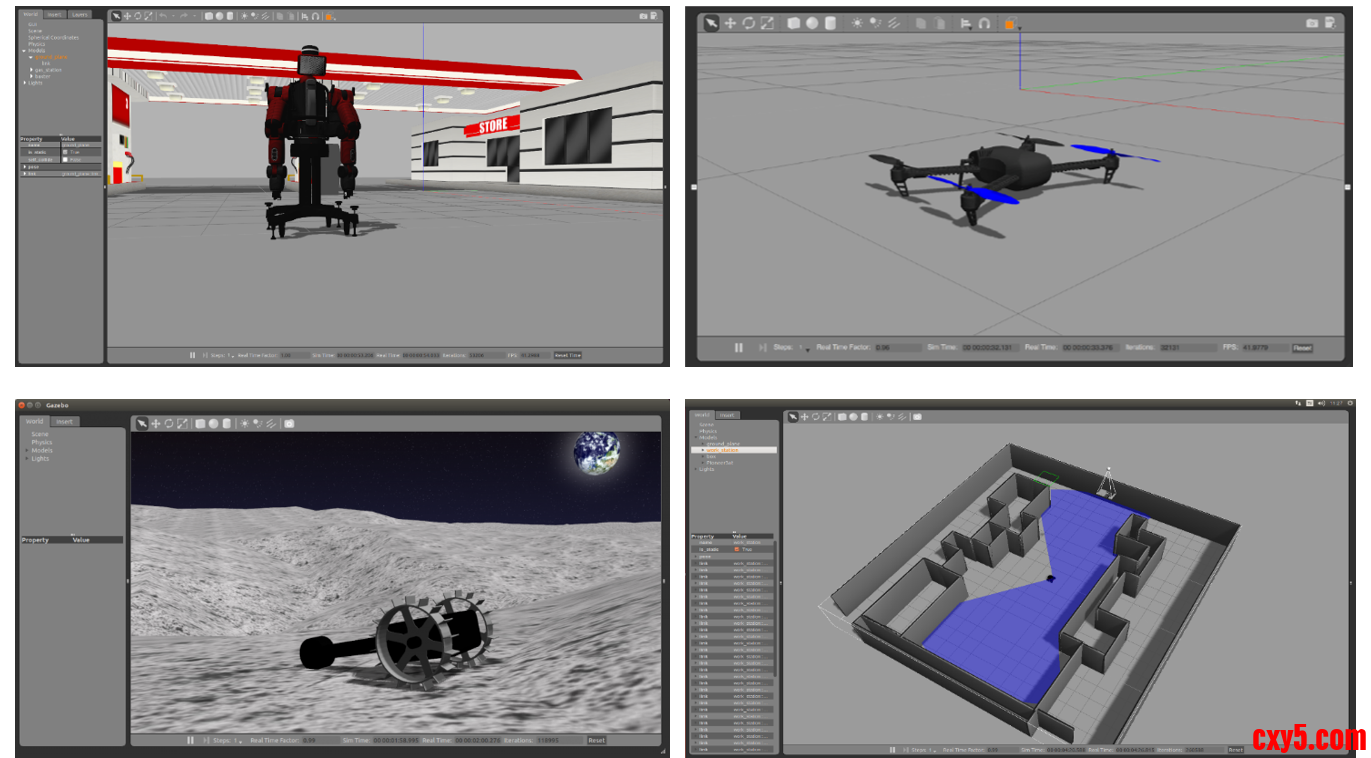
Gazebo是ROS系统中最为常用的三维物理仿真平台,支持动力学引擎,可以实现高质量的图形渲染,不仅可以模拟机器人及周边环境,还可以加入摩擦力、弹性系数等物理属性。
比如我们要开发一个火星车,那就可以在Gazebo中模拟火星表面的环境,再比如我们做无人机,续航和限飞都导致我们没有办法频繁用实物做实验,此时不妨使用Gazebo先做仿真,等算法开发的差不多了,再部署到实物上来运行。
所以类似Gazebo这样的仿真平台,可以帮助我们验证机器人算法、优化机器人设计、测试机器人场景应用,为机器人开发提供更多可能。
1.1 安装测试
Gazebo如何使用呢?我们不妨先把它给跑起来,互相认识一下。
1.1.1 安装
为了确保系统中已经完整安装了Gazebo相关的功能包,我们可以通过这样一个命令,简单直接的把和Gazebo相关的包都给装上:- zhengyang@ubuntu:~/dev_ws$ sudo apt install ros-humble-gazebo-*
1.1.2 运行
接着我们通过这句命令启动Gazebo:- zhengyang@ubuntu:~/dev_ws$ source /usr/share/gazebo/setup.sh
- zhengyang@ubuntu:~/dev_ws$ ros2 launch gazebo_ros gazebo.launch.py
1.1.3 导入模型
下载模型,osrf库包含许多常用模型:- zhengyang@ubuntu:~$ mkdir ~/.gazebo/models
- zhengyang@ubuntu:~$ cd ~/.gazebo/models
- zhengyang@ubuntu:~/.gazebo/models$ git clone --depth 1 https://github.com/osrf/gazebo_models.git
- zhengyang@ubuntu:~/.gazebo/models$ mv gazebo_models/* ./
- zhengyang@ubuntu:~/.gazebo/models$ rm -rf gazebo_models/
1.1.4 测试
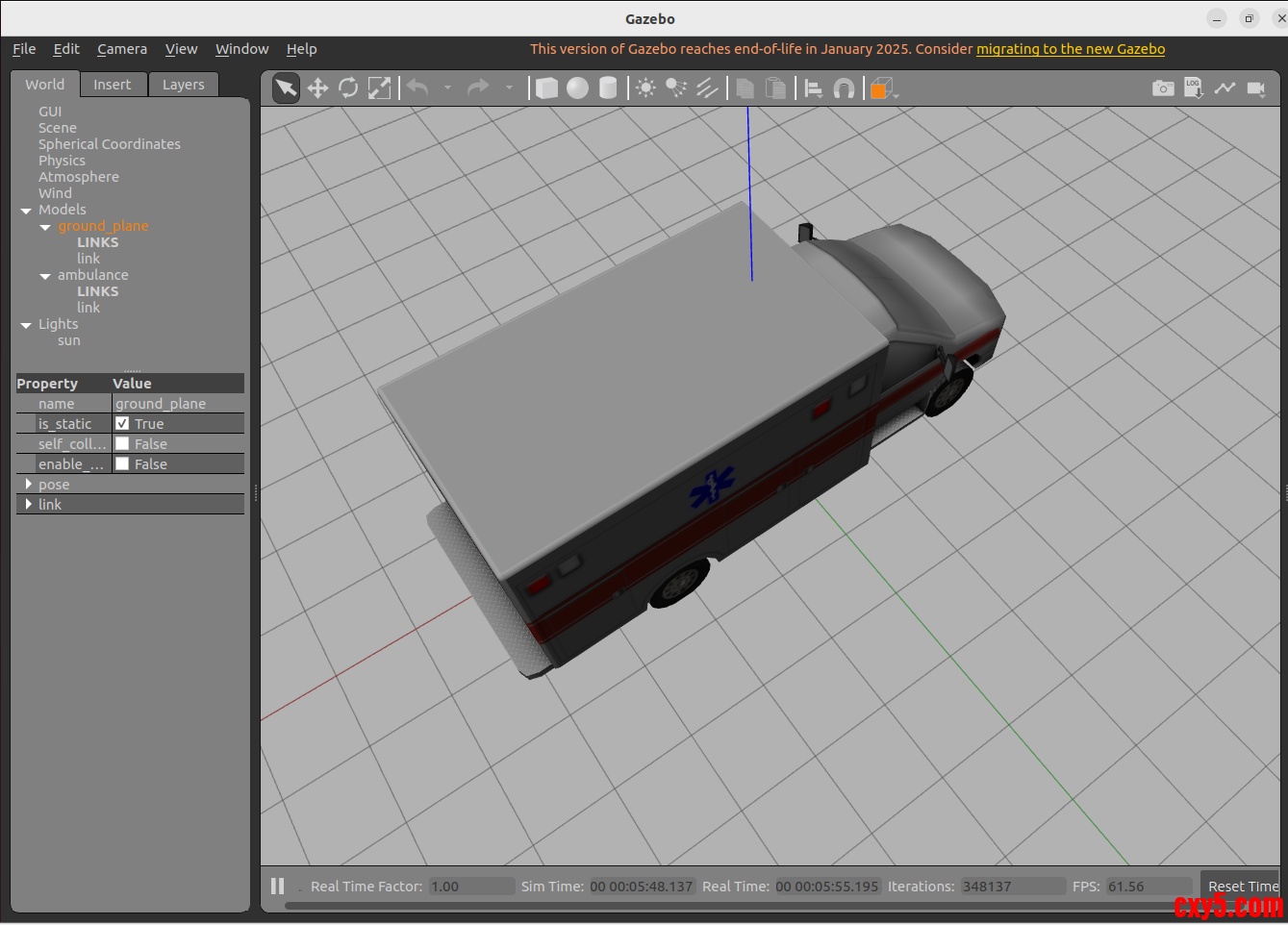
打开Gazebo,在Insert面板中选择ambulance模型导入,查看效果;
1.2 Gazebo GUI简介
接下来,我们将对Gazebo图形用户界面进行介绍。我们将学习到一些基本操作,例如按钮的功能以及如何在场景中导航。
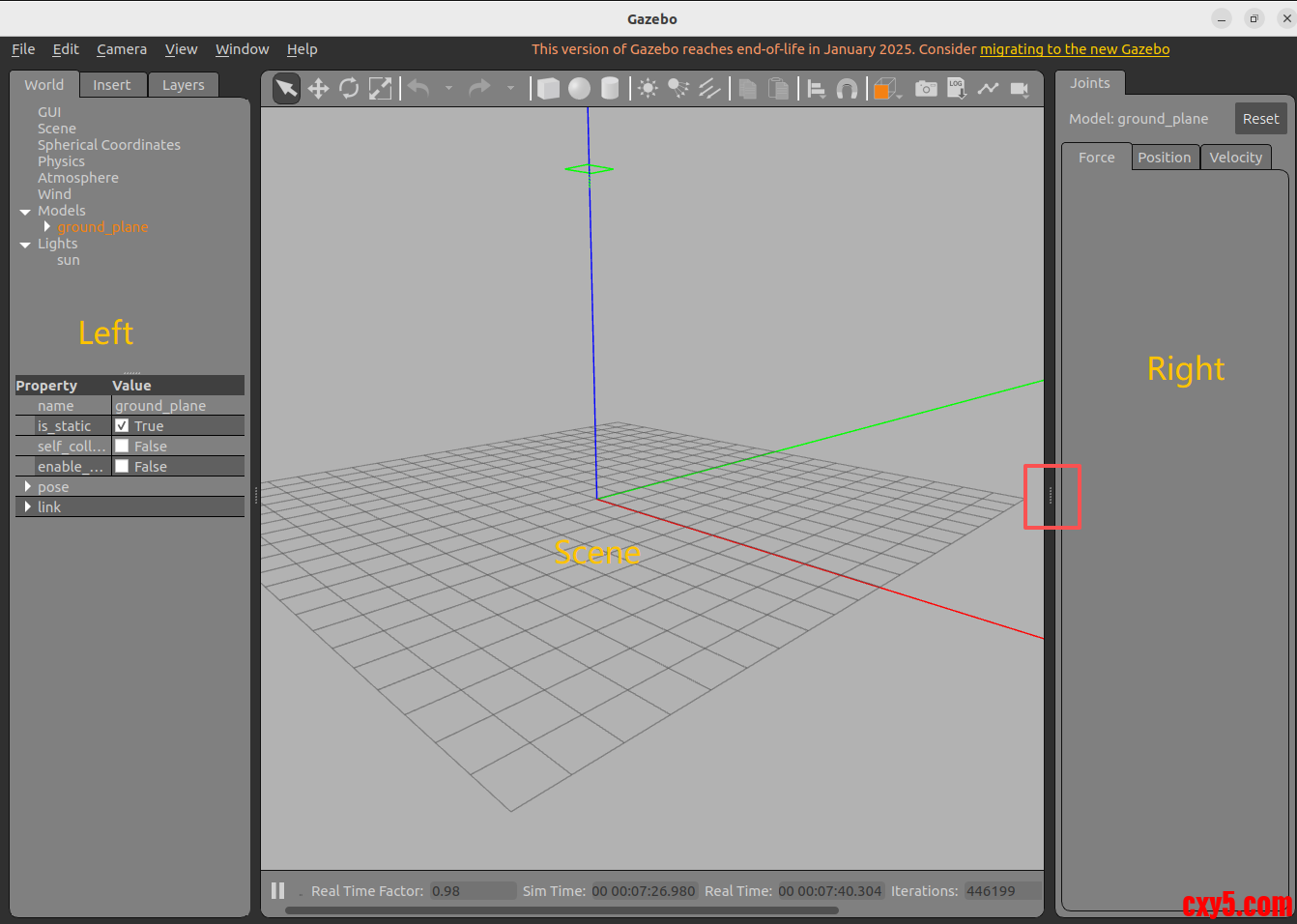
启动Gazebo后,你将看到这个界面:
Gazebo交互界面由许多组成部分,接下来将逐一介绍。
1.2.1 场景(Scene)
场景是模拟器的主要部分,是仿真模型显示的地方,你可以在这操作仿真对象,使其与环境进行交互。
1.2.2 面板(Panels)
面板分为左右两侧,可以把两侧的面板设置为显示、隐藏或调整它的大小。
1.2.2.1 左侧面板
启动Gazebo时,默认情况下会显示左侧面板。面板中有三个选项卡:
- World:该选项卡显示当前场景中的模型,并允许您查看和修改模型参数,例如它们的姿势。您也可以通过展开GUI选项并调整相机姿势来更改相机视角;
- Insert:该选项卡是向仿真场景中添加新对象(模型),要查看模型列表,需要单击箭头展开文件夹。单击(并释放)要插入的模型,然后在场景中再次单击以添加它;
- Layers:该选项卡组织并显示仿真中可用的不同可视化组,一个图层可以包含一个或多个模型,打开或关闭图层将显示或隐藏该图层中的模型。这是一个可选功能,因此在大多数情况下,此选项卡将为空;
1.2.2.2 右侧面板
默认情况下,右侧面板处于隐藏状态。单击并拖动该栏以将其打开。右面板可用于与选定模型的移动部件(关节)交互。如果场景中没有选择模型,面板将不显示任何信息。
1.2.3<xacro:property name="wheel_radius" value="0.1" />
<xacro:property name="wheel_length" value="0.05" />
<xacro:property name="pi" value="3.14159" />
<cylinder radius="${wheel_radius}" length="${wheel_length}" />
<xacro:property name="wheel_circumference" value="${2 * pi * wheel_radius}" />
<xacro:property name="default_origin">
<origin xyz="0 0 0" rpy="0 0 0" />
</xacro:property>工具栏(Toolbars)
Gazebo界面有两个工具栏。一个位于场景上方,另一个位于下方。
1.2.3.1 顶部工具栏
顶部工具栏为主工具栏,包含一些与模拟器交互时最常用的选项,如按钮:选择、移动、旋转和缩放;创建简单形状(例如立方体、球体、圆柱体)以及复制/粘贴。
- 选择模型(Select mode):在场景中做标注;
- 转换模式(Translate mode):选择要移动的模型;
- 旋转模式(Rotate mode):选择要旋转的模型;
- 缩放模式(Scale mode):选择要缩放的模型;
- 撤消/重做(Undo/Redo):撤消/重做场景中的操作;
- 灯光(Lights):将灯光添加到场景;
- 复制/粘贴(Copy/Paste):复制/粘贴场景中的模型;
- 对齐(Align):将模型彼此对齐;
- 捕捉(Snap):将一个模型捕捉到另一个模型;
- 更改视图(Change view):从不同角度查看场景。
1.2.3.2 底部工具栏
底部工具栏显示有关仿真的数据,如仿真时间(Simulation time)及其与真实时间(Real time)的关系;
- 仿真时间是指当仿真运行时,时间在仿真环境中过得有多快,仿真可以比真实时间慢或快,具体取决于运行仿真所需的计算量;
- 真实时间是指在仿真环境中运行时实际经过的时间,仿真时间和真实时间的比率称为实时因子;
世界状态每迭代一次就更新一次,您可以在底部工具栏的右侧看到迭代次数,每次迭代都会将仿真推进一个固定的秒数,称为步长。默认情况下,步长为1ms。您可以按暂停按钮暂停仿真,并使用步长按键一次执行多个步长。
1.2.3.3 菜单栏
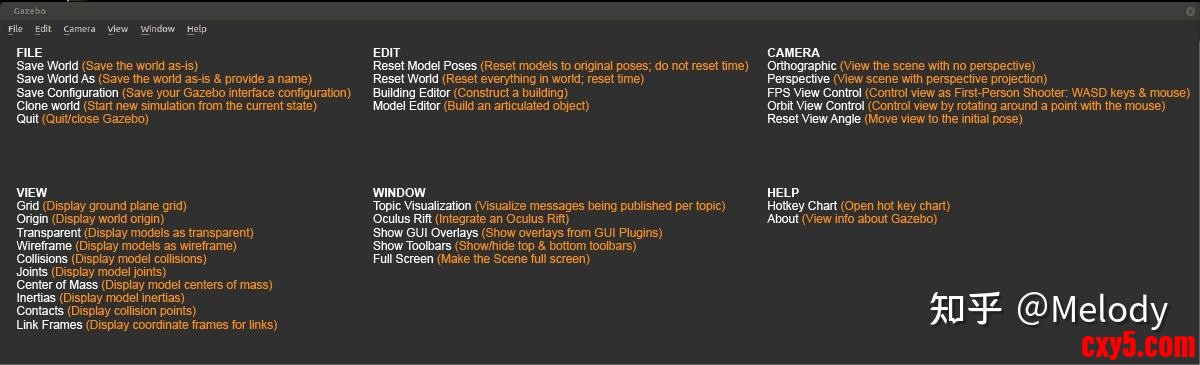
像大多数应用程序一样,Gazebo顶部有一个应用程序菜单。某些菜单选项会显示工具栏中。在场景中,右键单击上下文菜单选项,可查看各种菜单。注意:有些Linux桌面会隐藏应用程序菜单。如果看不到菜单,请将光标移到应用程序窗口的顶部,菜单就会出现。
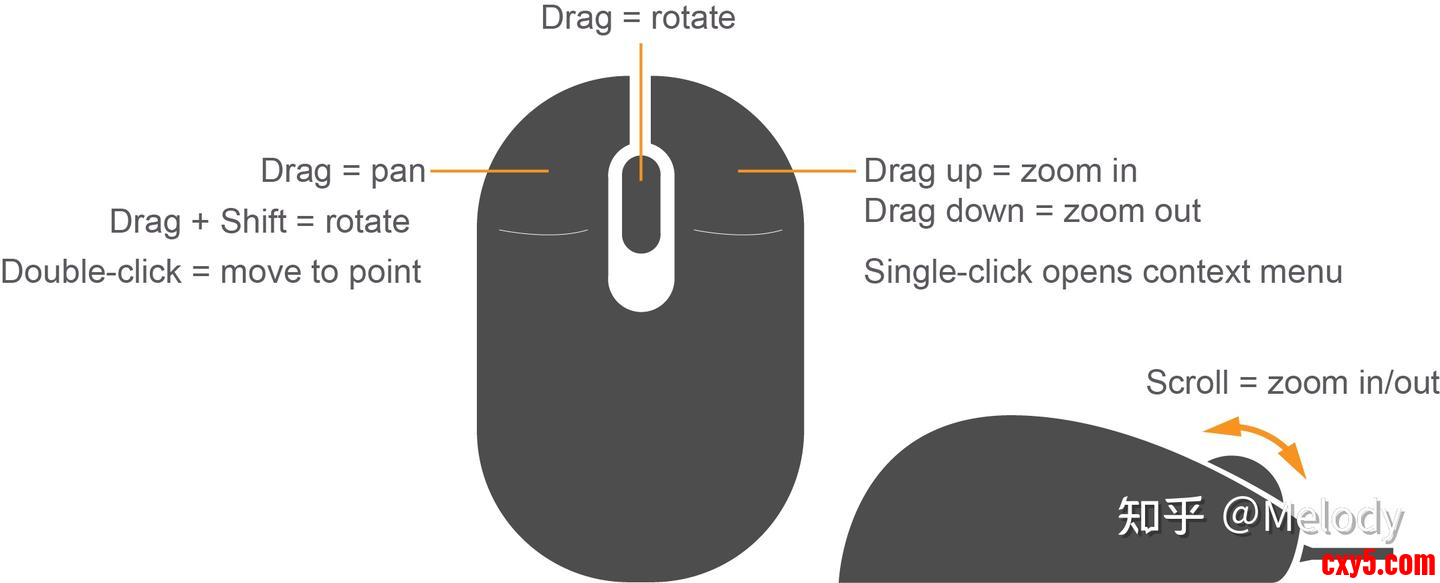
1.2.4 鼠标
鼠标在场景中导航时非常有用。强烈建议使用带滚轮的鼠标。下面是在场景中导航和更改视角的基本鼠标操作。右键单击模型将打开一个包含各种选项的上下文菜单。
认识了Gazebo,接下来是不是该试试机器人仿真啦?
大家还记得之前课程中,我们设计的移动机器人模型么?我们一起尝试把它放到Gazebo中,还要控制它在仿真环境中运动。
1.3 模型文件
Gazebo支持多种模型文件格式,它们通常分为两大类:模型描述文件和模型资源文件。
下图清晰地展示了这两大类及其包含的具体格式:
1.3.1 模型描述文件
这是Gazebo模型的“大脑”,用于定义模型的结构、物理属性、关节和插件等。
1.3.1.1 SDF (Simulation Description Format)
Gazebo原生、最核心且功能最强大的格式,文件后缀为.sdf 或 .world。其特点:
- 分层描述:一个<xacro:property name="wheel_radius" value="0.1" />
<xacro:property name="wheel_length" value="0.05" />
<xacro:property name="pi" value="3.14159" />
<cylinder radius="${wheel_radius}" length="${wheel_length}" />
<xacro:property name="wheel_circumference" value="${2 * pi * wheel_radius}" />
<xacro:property name="default_origin">
<origin xyz="0 0 0" rpy="0 0 0" />
</xacro:property>可以嵌套包含另一个 ,非常适合构建复杂的复合模型(如一辆带传感器的机器人汽车);
- 功能全面:除了基本的模型定义,还原生支持光照、大气、物理引擎参数等完整的仿真环境设置;
- 版本化:格式有版本号(如SDF 1.6, 1.9),不同版本的Gazebo支持不同的SDF版本。
使用场景:构建Gazebo世界(.world文件)、定义复杂机器人模型、配置完整的仿真环境。
1.3.1.2 URDF (Unified Robot Description Format)
ROS生态中的标准机器人描述格式,在Gazebo中通过插件兼容,文件后缀为.urdf 或 .xacro。其特点:
- 树形结构:机器人模型必须是一个没有闭环的树形结构(通过关节连接连杆),这很符合大多数机器人的实际结构;
- 侧重机器人:主要用于描述单个机器人;
- 需要扩展:原生URDF缺乏仿真所需的许多属性(如摩擦系数、惯性细节)。为了在Gazebo中正常使用,通常需要在URDF标签内添加Gazebo特定的扩展标签(如 )。
使用场景:主要在ROS项目中描述机器人模型,.xacro 文件可以通过 ros2 run xacro xacro 命令预处理生成 .urdf 文件。
1.3.2 模型资源文件
这些是“血肉”,为模型提供具体的几何形状、视觉外观和特效。
1.3.2.1 3D网格文件
这是最关键的资源文件,决定了模型的3D形状。
- Collada (.dae):Gazebo官方推荐的格式。支持颜色、纹理贴图、多材质和法线贴图等高级视觉特性,效果最好;
- OBJ (.obj):广泛支持的简单格式,同样支持纹理贴图(需配合 .mtl 材质文件);
- STL (.stl):非常常见的3D打印格式,但只包含纯几何三角面片,不支持颜色和纹理,在Gazebo中视觉效果单一。
1.3.2.2 材质与纹理文件
OGRE材质脚本 (.material):用于定义复杂的着色器、纹理混合等高级渲染效果。
图像纹理文件 (.png, .jpg):贴在3D网格表面的图片,提供真实感。
1.3.2.3 粒子效果文件
定义烟雾、火焰、水流等动态粒子效果。
1.3.3 标准模型目录
一个标准的Gazebo模型包应包含以下文件:这个模型文件夹可以放在你的Gazebo模型路径下(如 ~/.gazebo/models/),Gazebo启动时会自动扫描并加载。
二、自定义模型案例
我们在《ROS2之URDF建模》设计好的URDF模型此时还不能直接放到Gazebo中,需要我们做一些优化。这里给大家介绍一个URDF文件格式的升级版本——XACRO文件。
我们就通过XACRO文件对移动机器人的模型做一下优化,我们首先要使用这句命令安装必要的功能包;- zhengyang@ubuntu:~/.gazebo/models$ sudo apt install ros-humble-xacro
同样也是对机器人URDF模型的创建,XACRO文件加入了更多编程化的实现方法,可以让模型创建更友好。比如:
- 宏定义:一个小车有4个轮子,每个轮子都一样,我们就没必要创建4个一样的link,像函数定义一样,做一个可重复使用的模块就可以了;
- 文件包含:复杂机器人的模型文件可能会很长,为了切分不同的模块,比如底盘、传感器,我们还可以把不同模块的模型放置在不同的文件中,然后再用一个总体文件做包含调用;
- 可编程接口:比如在XACRO模型文件中,定义一些常量,描述机器人的尺寸,定义一些变量,在调用宏定义的时候传递数据,还可以在模型中做数据计算,甚至加入条件语句,比如你的机器人叫A,就有摄像头,如果叫B,就没有摄像头;
下面我们将详细介绍其核心语法和用法。
2.1.1 常量定义
用于定义可重用的常量值,是变量管理的基础;- <xacro:property name="wheel_radius" value="0.1" />
- <xacro:property name="wheel_length" value="0.05" />
- <xacro:property name="pi" value="3.14159" />
- <cylinder radius="${wheel_radius}" length="${wheel_length}" />
- <xacro:property name="wheel_circumference" value="${2 * pi * wheel_radius}" />
- <xacro:property name="default_origin">
- <origin xyz="0 0 0" rpy="0 0 0" />
- </xacro:property>
2.1.2 数学计算
XACRO支持丰富的数学运算和条件表达式;如果需要做数学计算,同样是在${}中进行,比如某一个位置,我们可以通过这两个常量做运算得到,就加入了加法和除法运算。
2.1.3 宏定义
宏是代码复用的关键,可以看作函数或模板;宏的定义方式是通过这个标签描述的,还可以像函数一样,设置里边会用到的一些参数,比如这里的A、B、C。
当需要使用这个宏的时候,通过宏名字的标签,来调用,同时要记得把几个参数设置好。
2.1.4 文件包含
将大型机器人模型分解为多个文件;2.1.5 块参数与内容插入
高级宏特性,允许传递xml块;2.1.6 项目结构
一个完整的项目结构如下“2.2 机器人仿真
创建my_learning_urdf的Python版本的功能包;- pi@NanoPC-T6:~/dev_ws$ cd src
- pi@NanoPC-T6:~/dev_ws/src$ ros2 pkg create --build-type ament_python my_learning_gazebo
- urdf:存放机器人模型的URDF或xacro文件;
- meshes:放置URDF中引用的模型渲染文件;
- launch:保存相关启动文件;
- rviz:保存rviz的配置文件。
我们需要修改setup.py文件,添加配置文件:- import osfrom glob import glob<xacro:property name="wheel_radius" value="0.1" />
- <xacro:property name="wheel_length" value="0.05" />
- <xacro:property name="pi" value="3.14159" />
- <cylinder radius="${wheel_radius}" length="${wheel_length}" />
- <xacro:property name="wheel_circumference" value="${2 * pi * wheel_radius}" />
- <xacro:property name="default_origin">
- <origin xyz="0 0 0" rpy="0 0 0" />
- </xacro:property><xacro:property name="wheel_radius" value="0.1" />
- <xacro:property name="wheel_length" value="0.05" />
- <xacro:property name="pi" value="3.14159" />
- <cylinder radius="${wheel_radius}" length="${wheel_length}" />
- <xacro:property name="wheel_circumference" value="${2 * pi * wheel_radius}" />
- <xacro:property name="default_origin">
- <origin xyz="0 0 0" rpy="0 0 0" />
- </xacro:property>...<xacro:property name="wheel_radius" value="0.1" />
- <xacro:property name="wheel_length" value="0.05" />
- <xacro:property name="pi" value="3.14159" />
- <cylinder radius="${wheel_radius}" length="${wheel_length}" />
- <xacro:property name="wheel_circumference" value="${2 * pi * wheel_radius}" />
- <xacro:property name="default_origin">
- <origin xyz="0 0 0" rpy="0 0 0" />
- </xacro:property><xacro:property name="wheel_radius" value="0.1" />
- <xacro:property name="wheel_length" value="0.05" />
- <xacro:property name="pi" value="3.14159" />
- <cylinder radius="${wheel_radius}" length="${wheel_length}" />
- <xacro:property name="wheel_circumference" value="${2 * pi * wheel_radius}" />
- <xacro:property name="default_origin">
- <origin xyz="0 0 0" rpy="0 0 0" />
- </xacro:property>data_files=[<xacro:property name="wheel_radius" value="0.1" />
- <xacro:property name="wheel_length" value="0.05" />
- <xacro:property name="pi" value="3.14159" />
- <cylinder radius="${wheel_radius}" length="${wheel_length}" />
- <xacro:property name="wheel_circumference" value="${2 * pi * wheel_radius}" />
- <xacro:property name="default_origin">
- <origin xyz="0 0 0" rpy="0 0 0" />
- </xacro:property><xacro:property name="wheel_radius" value="0.1" />
- <xacro:property name="wheel_length" value="0.05" />
- <xacro:property name="pi" value="3.14159" />
- <cylinder radius="${wheel_radius}" length="${wheel_length}" />
- <xacro:property name="wheel_circumference" value="${2 * pi * wheel_radius}" />
- <xacro:property name="default_origin">
- <origin xyz="0 0 0" rpy="0 0 0" />
- </xacro:property><xacro:property name="wheel_radius" value="0.1" />
- <xacro:property name="wheel_length" value="0.05" />
- <xacro:property name="pi" value="3.14159" />
- <cylinder radius="${wheel_radius}" length="${wheel_length}" />
- <xacro:property name="wheel_circumference" value="${2 * pi * wheel_radius}" />
- <xacro:property name="default_origin">
- <origin xyz="0 0 0" rpy="0 0 0" />
- </xacro:property><xacro:property name="wheel_radius" value="0.1" />
- <xacro:property name="wheel_length" value="0.05" />
- <xacro:property name="pi" value="3.14159" />
- <cylinder radius="${wheel_radius}" length="${wheel_length}" />
- <xacro:property name="wheel_circumference" value="${2 * pi * wheel_radius}" />
- <xacro:property name="default_origin">
- <origin xyz="0 0 0" rpy="0 0 0" />
- </xacro:property>('share/ament_index/resource_index/packages',<xacro:property name="wheel_radius" value="0.1" />
- <xacro:property name="wheel_length" value="0.05" />
- <xacro:property name="pi" value="3.14159" />
- <cylinder radius="${wheel_radius}" length="${wheel_length}" />
- <xacro:property name="wheel_circumference" value="${2 * pi * wheel_radius}" />
- <xacro:property name="default_origin">
- <origin xyz="0 0 0" rpy="0 0 0" />
- </xacro:property><xacro:property name="wheel_radius" value="0.1" />
- <xacro:property name="wheel_length" value="0.05" />
- <xacro:property name="pi" value="3.14159" />
- <cylinder radius="${wheel_radius}" length="${wheel_length}" />
- <xacro:property name="wheel_circumference" value="${2 * pi * wheel_radius}" />
- <xacro:property name="default_origin">
- <origin xyz="0 0 0" rpy="0 0 0" />
- </xacro:property><xacro:property name="wheel_radius" value="0.1" />
- <xacro:property name="wheel_length" value="0.05" />
- <xacro:property name="pi" value="3.14159" />
- <cylinder radius="${wheel_radius}" length="${wheel_length}" />
- <xacro:property name="wheel_circumference" value="${2 * pi * wheel_radius}" />
- <xacro:property name="default_origin">
- <origin xyz="0 0 0" rpy="0 0 0" />
- </xacro:property><xacro:property name="wheel_radius" value="0.1" />
- <xacro:property name="wheel_length" value="0.05" />
- <xacro:property name="pi" value="3.14159" />
- <cylinder radius="${wheel_radius}" length="${wheel_length}" />
- <xacro:property name="wheel_circumference" value="${2 * pi * wheel_radius}" />
- <xacro:property name="default_origin">
- <origin xyz="0 0 0" rpy="0 0 0" />
- </xacro:property><xacro:property name="wheel_radius" value="0.1" />
- <xacro:property name="wheel_length" value="0.05" />
- <xacro:property name="pi" value="3.14159" />
- <cylinder radius="${wheel_radius}" length="${wheel_length}" />
- <xacro:property name="wheel_circumference" value="${2 * pi * wheel_radius}" />
- <xacro:property name="default_origin">
- <origin xyz="0 0 0" rpy="0 0 0" />
- </xacro:property><xacro:property name="wheel_radius" value="0.1" />
- <xacro:property name="wheel_length" value="0.05" />
- <xacro:property name="pi" value="3.14159" />
- <cylinder radius="${wheel_radius}" length="${wheel_length}" />
- <xacro:property name="wheel_circumference" value="${2 * pi * wheel_radius}" />
- <xacro:property name="default_origin">
- <origin xyz="0 0 0" rpy="0 0 0" />
- </xacro:property>['resource/' + package_name]),<xacro:property name="wheel_radius" value="0.1" />
- <xacro:property name="wheel_length" value="0.05" />
- <xacro:property name="pi" value="3.14159" />
- <cylinder radius="${wheel_radius}" length="${wheel_length}" />
- <xacro:property name="wheel_circumference" value="${2 * pi * wheel_radius}" />
- <xacro:property name="default_origin">
- <origin xyz="0 0 0" rpy="0 0 0" />
- </xacro:property><xacro:property name="wheel_radius" value="0.1" />
- <xacro:property name="wheel_length" value="0.05" />
- <xacro:property name="pi" value="3.14159" />
- <cylinder radius="${wheel_radius}" length="${wheel_length}" />
- <xacro:property name="wheel_circumference" value="${2 * pi * wheel_radius}" />
- <xacro:property name="default_origin">
- <origin xyz="0 0 0" rpy="0 0 0" />
- </xacro:property><xacro:property name="wheel_radius" value="0.1" />
- <xacro:property name="wheel_length" value="0.05" />
- <xacro:property name="pi" value="3.14159" />
- <cylinder radius="${wheel_radius}" length="${wheel_length}" />
- <xacro:property name="wheel_circumference" value="${2 * pi * wheel_radius}" />
- <xacro:property name="default_origin">
- <origin xyz="0 0 0" rpy="0 0 0" />
- </xacro:property><xacro:property name="wheel_radius" value="0.1" />
- <xacro:property name="wheel_length" value="0.05" />
- <xacro:property name="pi" value="3.14159" />
- <cylinder radius="${wheel_radius}" length="${wheel_length}" />
- <xacro:property name="wheel_circumference" value="${2 * pi * wheel_radius}" />
- <xacro:property name="default_origin">
- <origin xyz="0 0 0" rpy="0 0 0" />
- </xacro:property>('share/' + package_name, ['package.xml']),<xacro:property name="wheel_radius" value="0.1" />
- <xacro:property name="wheel_length" value="0.05" />
- <xacro:property name="pi" value="3.14159" />
- <cylinder radius="${wheel_radius}" length="${wheel_length}" />
- <xacro:property name="wheel_circumference" value="${2 * pi * wheel_radius}" />
- <xacro:property name="default_origin">
- <origin xyz="0 0 0" rpy="0 0 0" />
- </xacro:property><xacro:property name="wheel_radius" value="0.1" />
- <xacro:property name="wheel_length" value="0.05" />
- <xacro:property name="pi" value="3.14159" />
- <cylinder radius="${wheel_radius}" length="${wheel_length}" />
- <xacro:property name="wheel_circumference" value="${2 * pi * wheel_radius}" />
- <xacro:property name="default_origin">
- <origin xyz="0 0 0" rpy="0 0 0" />
- </xacro:property><xacro:property name="wheel_radius" value="0.1" />
- <xacro:property name="wheel_length" value="0.05" />
- <xacro:property name="pi" value="3.14159" />
- <cylinder radius="${wheel_radius}" length="${wheel_length}" />
- <xacro:property name="wheel_circumference" value="${2 * pi * wheel_radius}" />
- <xacro:property name="default_origin">
- <origin xyz="0 0 0" rpy="0 0 0" />
- </xacro:property><xacro:property name="wheel_radius" value="0.1" />
- <xacro:property name="wheel_length" value="0.05" />
- <xacro:property name="pi" value="3.14159" />
- <cylinder radius="${wheel_radius}" length="${wheel_length}" />
- <xacro:property name="wheel_circumference" value="${2 * pi * wheel_radius}" />
- <xacro:property name="default_origin">
- <origin xyz="0 0 0" rpy="0 0 0" />
- </xacro:property>(os.path.join('share', package_name, 'launch'), glob(os.path.join('launch', '*.launch.py'))),<xacro:property name="wheel_radius" value="0.1" />
- <xacro:property name="wheel_length" value="0.05" />
- <xacro:property name="pi" value="3.14159" />
- <cylinder radius="${wheel_radius}" length="${wheel_length}" />
- <xacro:property name="wheel_circumference" value="${2 * pi * wheel_radius}" />
- <xacro:property name="default_origin">
- <origin xyz="0 0 0" rpy="0 0 0" />
- </xacro:property><xacro:property name="wheel_radius" value="0.1" />
- <xacro:property name="wheel_length" value="0.05" />
- <xacro:property name="pi" value="3.14159" />
- <cylinder radius="${wheel_radius}" length="${wheel_length}" />
- <xacro:property name="wheel_circumference" value="${2 * pi * wheel_radius}" />
- <xacro:property name="default_origin">
- <origin xyz="0 0 0" rpy="0 0 0" />
- </xacro:property><xacro:property name="wheel_radius" value="0.1" />
- <xacro:property name="wheel_length" value="0.05" />
- <xacro:property name="pi" value="3.14159" />
- <cylinder radius="${wheel_radius}" length="${wheel_length}" />
- <xacro:property name="wheel_circumference" value="${2 * pi * wheel_radius}" />
- <xacro:property name="default_origin">
- <origin xyz="0 0 0" rpy="0 0 0" />
- </xacro:property><xacro:property name="wheel_radius" value="0.1" />
- <xacro:property name="wheel_length" value="0.05" />
- <xacro:property name="pi" value="3.14159" />
- <cylinder radius="${wheel_radius}" length="${wheel_length}" />
- <xacro:property name="wheel_circumference" value="${2 * pi * wheel_radius}" />
- <xacro:property name="default_origin">
- <origin xyz="0 0 0" rpy="0 0 0" />
- </xacro:property>(os.path.join('share', package_name, 'urdf'), glob(os.path.join('urdf', '*.*'))),<xacro:property name="wheel_radius" value="0.1" />
- <xacro:property name="wheel_length" value="0.05" />
- <xacro:property name="pi" value="3.14159" />
- <cylinder radius="${wheel_radius}" length="${wheel_length}" />
- <xacro:property name="wheel_circumference" value="${2 * pi * wheel_radius}" />
- <xacro:property name="default_origin">
- <origin xyz="0 0 0" rpy="0 0 0" />
- </xacro:property><xacro:property name="wheel_radius" value="0.1" />
- <xacro:property name="wheel_length" value="0.05" />
- <xacro:property name="pi" value="3.14159" />
- <cylinder radius="${wheel_radius}" length="${wheel_length}" />
- <xacro:property name="wheel_circumference" value="${2 * pi * wheel_radius}" />
- <xacro:property name="default_origin">
- <origin xyz="0 0 0" rpy="0 0 0" />
- </xacro:property><xacro:property name="wheel_radius" value="0.1" />
- <xacro:property name="wheel_length" value="0.05" />
- <xacro:property name="pi" value="3.14159" />
- <cylinder radius="${wheel_radius}" length="${wheel_length}" />
- <xacro:property name="wheel_circumference" value="${2 * pi * wheel_radius}" />
- <xacro:property name="default_origin">
- <origin xyz="0 0 0" rpy="0 0 0" />
- </xacro:property><xacro:property name="wheel_radius" value="0.1" />
- <xacro:property name="wheel_length" value="0.05" />
- <xacro:property name="pi" value="3.14159" />
- <cylinder radius="${wheel_radius}" length="${wheel_length}" />
- <xacro:property name="wheel_circumference" value="${2 * pi * wheel_radius}" />
- <xacro:property name="default_origin">
- <origin xyz="0 0 0" rpy="0 0 0" />
- </xacro:property>(os.path.join('share', package_name, 'urdf/sensors'), glob(os.path.join('urdf/sensors', '*.*'))),<xacro:property name="wheel_radius" value="0.1" />
- <xacro:property name="wheel_length" value="0.05" />
- <xacro:property name="pi" value="3.14159" />
- <cylinder radius="${wheel_radius}" length="${wheel_length}" />
- <xacro:property name="wheel_circumference" value="${2 * pi * wheel_radius}" />
- <xacro:property name="default_origin">
- <origin xyz="0 0 0" rpy="0 0 0" />
- </xacro:property><xacro:property name="wheel_radius" value="0.1" />
- <xacro:property name="wheel_length" value="0.05" />
- <xacro:property name="pi" value="3.14159" />
- <cylinder radius="${wheel_radius}" length="${wheel_length}" />
- <xacro:property name="wheel_circumference" value="${2 * pi * wheel_radius}" />
- <xacro:property name="default_origin">
- <origin xyz="0 0 0" rpy="0 0 0" />
- </xacro:property><xacro:property name="wheel_radius" value="0.1" />
- <xacro:property name="wheel_length" value="0.05" />
- <xacro:property name="pi" value="3.14159" />
- <cylinder radius="${wheel_radius}" length="${wheel_length}" />
- <xacro:property name="wheel_circumference" value="${2 * pi * wheel_radius}" />
- <xacro:property name="default_origin">
- <origin xyz="0 0 0" rpy="0 0 0" />
- </xacro:property><xacro:property name="wheel_radius" value="0.1" />
- <xacro:property name="wheel_length" value="0.05" />
- <xacro:property name="pi" value="3.14159" />
- <cylinder radius="${wheel_radius}" length="${wheel_length}" />
- <xacro:property name="wheel_circumference" value="${2 * pi * wheel_radius}" />
- <xacro:property name="default_origin">
- <origin xyz="0 0 0" rpy="0 0 0" />
- </xacro:property>(os.path.join('share', package_name, 'meshes'), glob(os.path.join('meshes', '*.*'))),<xacro:property name="wheel_radius" value="0.1" />
- <xacro:property name="wheel_length" value="0.05" />
- <xacro:property name="pi" value="3.14159" />
- <cylinder radius="${wheel_radius}" length="${wheel_length}" />
- <xacro:property name="wheel_circumference" value="${2 * pi * wheel_radius}" />
- <xacro:property name="default_origin">
- <origin xyz="0 0 0" rpy="0 0 0" />
- </xacro:property><xacro:property name="wheel_radius" value="0.1" />
- <xacro:property name="wheel_length" value="0.05" />
- <xacro:property name="pi" value="3.14159" />
- <cylinder radius="${wheel_radius}" length="${wheel_length}" />
- <xacro:property name="wheel_circumference" value="${2 * pi * wheel_radius}" />
- <xacro:property name="default_origin">
- <origin xyz="0 0 0" rpy="0 0 0" />
- </xacro:property><xacro:property name="wheel_radius" value="0.1" />
- <xacro:property name="wheel_length" value="0.05" />
- <xacro:property name="pi" value="3.14159" />
- <cylinder radius="${wheel_radius}" length="${wheel_length}" />
- <xacro:property name="wheel_circumference" value="${2 * pi * wheel_radius}" />
- <xacro:property name="default_origin">
- <origin xyz="0 0 0" rpy="0 0 0" />
- </xacro:property><xacro:property name="wheel_radius" value="0.1" />
- <xacro:property name="wheel_length" value="0.05" />
- <xacro:property name="pi" value="3.14159" />
- <cylinder radius="${wheel_radius}" length="${wheel_length}" />
- <xacro:property name="wheel_circumference" value="${2 * pi * wheel_radius}" />
- <xacro:property name="default_origin">
- <origin xyz="0 0 0" rpy="0 0 0" />
- </xacro:property>(os.path.join('share', package_name, 'rviz'), glob(os.path.join('rviz', '*.rviz'))),<xacro:property name="wheel_radius" value="0.1" />
- <xacro:property name="wheel_length" value="0.05" />
- <xacro:property name="pi" value="3.14159" />
- <cylinder radius="${wheel_radius}" length="${wheel_length}" />
- <xacro:property name="wheel_circumference" value="${2 * pi * wheel_radius}" />
- <xacro:property name="default_origin">
- <origin xyz="0 0 0" rpy="0 0 0" />
- </xacro:property><xacro:property name="wheel_radius" value="0.1" />
- <xacro:property name="wheel_length" value="0.05" />
- <xacro:property name="pi" value="3.14159" />
- <cylinder radius="${wheel_radius}" length="${wheel_length}" />
- <xacro:property name="wheel_circumference" value="${2 * pi * wheel_radius}" />
- <xacro:property name="default_origin">
- <origin xyz="0 0 0" rpy="0 0 0" />
- </xacro:property>],<xacro:property name="wheel_radius" value="0.1" />
- <xacro:property name="wheel_length" value="0.05" />
- <xacro:property name="pi" value="3.14159" />
- <cylinder radius="${wheel_radius}" length="${wheel_length}" />
- <xacro:property name="wheel_circumference" value="${2 * pi * wheel_radius}" />
- <xacro:property name="default_origin">
- <origin xyz="0 0 0" rpy="0 0 0" />
- </xacro:property><xacro:property name="wheel_radius" value="0.1" />
- <xacro:property name="wheel_length" value="0.05" />
- <xacro:property name="pi" value="3.14159" />
- <cylinder radius="${wheel_radius}" length="${wheel_length}" />
- <xacro:property name="wheel_circumference" value="${2 * pi * wheel_radius}" />
- <xacro:property name="default_origin">
- <origin xyz="0 0 0" rpy="0 0 0" />
- </xacro:property>...
在urdf下新建文件mbot_gazebo.xacro;这个模型是基于《ROS2之URDF建模》中的mbot_base.urdf模型文件升级来的,构建步骤如下:
- 完善物理参数:第一步是确保每一个link都有惯性参数和碰撞属性,因为Gazebo是物理仿真平台,必要的物理参数是一定需要的;
- 添加Gazebo标签:第二步是为link添加gazebo标签,主要是为了可以在gazebo中渲染每一个link的颜色,因为URDF中的颜色系统和gazebo中的不同,所以得做一步这样的冗余配置;
- 配置传动装置:第三步是要给运动的joint配置传动装置,可以理解为仿真了一个电机;
- 添加控制器插件:第四步,要添加一个gazebo的控制器插件,小车是差速控制的,那就添加差速控制器插件,这样在不同角度下两个电机的速度分配,就可以交给控制器插件来完成了。
2.2.2 构建仿真环境
接下来就考虑如何把模型加载到Gazebo中了,需要用到一个gazebo提供的功能节点spwan_entity。
在launch文件夹下创建load_urdf_into_gazebo.launch.py文件;
[code]import osfrom ament_index_python.packages import get_package_share_directoryfrom launch import LaunchDescriptionfrom launch.actions import IncludeLaunchDescriptionfrom launch.launch_description_sources import PythonLaunchDescriptionSourcefrom launch_ros.actions import Nodedef generate_launch_description():<xacro:property name="wheel_radius" value="0.1" />
<xacro:property name="wheel_length" value="0.05" />
<xacro:property name="pi" value="3.14159" />
<cylinder radius="${wheel_radius}" length="${wheel_length}" />
<xacro:property name="wheel_circumference" value="${2 * pi * wheel_radius}" />
<xacro:property name="default_origin">
<origin xyz="0 0 0" rpy="0 0 0" />
</xacro:property><xacro:property name="wheel_radius" value="0.1" />
<xacro:property name="wheel_length" value="0.05" />
<xacro:property name="pi" value="3.14159" />
<cylinder radius="${wheel_radius}" length="${wheel_length}" />
<xacro:property name="wheel_circumference" value="${2 * pi * wheel_radius}" />
<xacro:property name="default_origin">
<origin xyz="0 0 0" rpy="0 0 0" />
</xacro:property># Include the robot_state_publisher launch file, provided by our own package. Force sim time to be enabled<xacro:property name="wheel_radius" value="0.1" />
<xacro:property name="wheel_length" value="0.05" />
<xacro:property name="pi" value="3.14159" />
<cylinder radius="${wheel_radius}" length="${wheel_length}" />
<xacro:property name="wheel_circumference" value="${2 * pi * wheel_radius}" />
<xacro:property name="default_origin">
<origin xyz="0 0 0" rpy="0 0 0" />
</xacro:property><xacro:property name="wheel_radius" value="0.1" />
<xacro:property name="wheel_length" value="0.05" />
<xacro:property name="pi" value="3.14159" />
<cylinder radius="${wheel_radius}" length="${wheel_length}" />
<xacro:property name="wheel_circumference" value="${2 * pi * wheel_radius}" />
<xacro:property name="default_origin">
<origin xyz="0 0 0" rpy="0 0 0" />
</xacro:property># !!! MAKE SURE YOU SET THE PACKAGE NAME CORRECTLY !!!<xacro:property name="wheel_radius" value="0.1" />
<xacro:property name="wheel_length" value="0.05" />
<xacro:property name="pi" value="3.14159" />
<cylinder radius="${wheel_radius}" length="${wheel_length}" />
<xacro:property name="wheel_circumference" value="${2 * pi * wheel_radius}" />
<xacro:property name="default_origin">
<origin xyz="0 0 0" rpy="0 0 0" />
</xacro:property><xacro:property name="wheel_radius" value="0.1" />
<xacro:property name="wheel_length" value="0.05" />
<xacro:property name="pi" value="3.14159" />
<cylinder radius="${wheel_radius}" length="${wheel_length}" />
<xacro:property name="wheel_circumference" value="${2 * pi * wheel_radius}" />
<xacro:property name="default_origin">
<origin xyz="0 0 0" rpy="0 0 0" />
</xacro:property>package_name='learning_gazebo' # |





 提升卡
提升卡 置顶卡
置顶卡 沉默卡
沉默卡 喧嚣卡
喧嚣卡 变色卡
变色卡 千斤顶
千斤顶 照妖镜
照妖镜


