pytest框架——fixture
pytest 中的fixture 是⼀种强大的机制,用于提供测试函数所需的资源或上下文。它可以用于设置测试环境、准备数据等。以下是fixture 的⼀些核心概念和使用场景.
- def fixture_01():
- print("第⼀个fixture标记的方法")
- def test_01():
- fixture_01()
- print("第⼀个测试用例")
- collected 1 item
- test_xxx.py::test_01 第一个fixture标记的方法
- 第一个测试用例
- PASSED
- import pytest
- @pytest.fixture
- def fixture_01():
- print("第⼀个fixture标记的方法")
- def test_01(fixture_01):
- print("第⼀个测试⽤例")
- collected 1 item
- test_xxx.py::test_01 第一个fixture标记的方法
- 第一个测试用例
- PASSED
- 未标记 fixture ⽅法的调用与 fixture 标记的方法调⽤完全不⼀样,前者需要在⽅法体中调用,而后者可以将函数名作为参数进行调⽤。
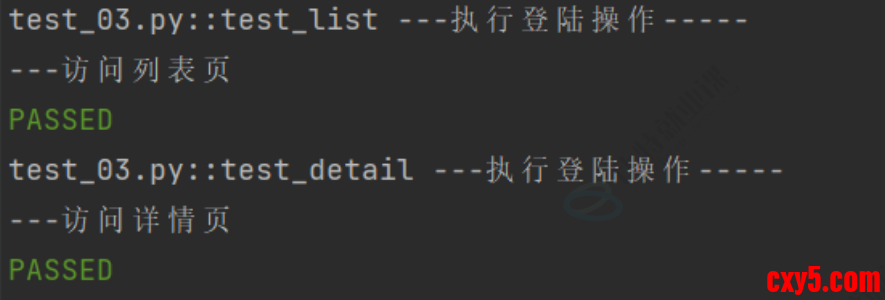
- 示例2:访问列表页和详情页之前都需要执行登录操作
- import pytest
- @pytest.fixture
- def login():
- print("---执⾏登陆操作-----")
- def test_list(login):
- print("---访问列表⻚")
- def test_detail(login):
- print("---访问详情⻚")
- 运行结果:
- 通过使用@pytest.fixture 装饰器来告诉pytest⼀个特定函数是⼀个fixture,通过运行结果可见,在执行列表页和详情页之前都会先执行 login 方法。
fixture嵌套
- import pytest
-
- @pytest.fixture
- def first_entry():
- return "a"
-
- @pytest.fixture
- def order(first_entry):
- return [first_entry]
- def test_string(order):
- order.append("b")
- assert order == ["a", "b"]
- 测试不必局限于单个fixture ,它们可以依赖于想要的任意数量的fixture ,并且fixture 也可以使⽤其他fixture。
请求多个fixture
- import pytest
- class Fruit:
- def __init__(self, name):
- self.name = name
- def __eq__(self, other):
- return self.name == other.name
- @pytest.fixture
- def my_fruit():
- return Fruit("apple")
- @pytest.fixture
- def fruit_basket(my_fruit):
- return [Fruit("banana"), my_fruit]
- def test_my_fruit_in_basket(my_fruit, fruit_basket):
- assert my_fruit in fruit_basket
- 测试和 fixture 不仅限于⼀次请求单个 fixture ,它们可以请求任意多个。
yield fixture
- 当运行测试时,我们希望确保它们能够自己清理,以便它们不会⼲扰其他测试(同时也避免留下⼤量测试数据来膨胀系统)。pytest中的 fixture 提供了⼀个⾮常有用拆卸系统,它允许我们为每个 fixture 定义具体的清理步骤。
- “Yield” fixture 使用 yield 而不是 return 。有了这些 fixture ,我们可以运行⼀些代码,并将对象返回给请求的 fixture/test ,就像其他 fixture ⼀样。唯⼀的不同是:
- return 被替换为 yield 。
- 该 fixture 的任何拆卸代码放置在 yield 之后。
- ⼀旦 pytest 确定了 fixture 的线性顺序,它将运行每个 fixture 直到它返回或 yield ,然后继续执行列表中的下⼀个 fixture 做同样的事情。测试完成后,pytest 将逆向遍历 fixture 列表,对于每个 yield 的 fixture ,运行 yield语句之后的代码。
- 示例:
- import pytest
- @pytest.fixture
- def open_close():
- print("前置操作,初始化.....")
- yield
- print("后置操作,清理数据.....")
- def test_01(open_close):
- print("第⼀个测试⽤例")
带参数的fixture
- pytest.fixture(scope='', params='', autouse='', ids='', name='')
- scope 参数用于控制fixture的作⽤范围,决定了fixture的⽣命周期。可选值有:
- function (默认):每个测试函数都会调⽤⼀次fixture。
- class :在同⼀个测试类中共享这个fixture。
- module :在同⼀个测试模块中共享这个fixture。(⼀个⽂件⾥)
- package:每个包执行一次
- session :整个测试会话中共享这个fixture。
- autouse 参数默认为 False 。如果设置为 True ,则每个测试函数都会⾃动调⽤该fixture,⽆需显式传⼊
- params 参数⽤于参数化fixture,⽀持列表传⼊。每个参数值都会使fixture执行⼀次,类似于for循环
- @pytest.fixture(params=["张三", "李四", "王五"])
- def user(request): # 固定用 request 内置夹具获取参数
- return request.param
- 效果:用例跑 3 次,分别传入 3 个名字。
- ids 参数与 params 配合使⽤,为每个参数化实例指定可读的标识符(给参数取名字)
- @pytest.fixture(params=["张三", "李四"], ids=["user1", "user2"])
- def user(request):
- return request.param
- 效果:运行时显示:test_01[user1]、test_01[user2]
- name 参数用于为fixture显式设置⼀个名称。如果使用了 name ,则在测试函数中需要使⽤这个名称来引⽤ fixture (给fixture取名字)
- @pytest.fixture(name="fix") # 别名 fix
- def fixture_01():
- print("fixture 执行")
- def test_01(fix): # 使用别名
- print("用例执行")
免责声明:如果侵犯了您的权益,请联系站长,我们会及时删除侵权内容,谢谢合作! |



 提升卡
提升卡 置顶卡
置顶卡 沉默卡
沉默卡 喧嚣卡
喧嚣卡 变色卡
变色卡 千斤顶
千斤顶 照妖镜
照妖镜


