官网教程
官方技能
- 环境依赖node,自行安装node.js
brew install node
- 检查node版本大于22
node -v
1. 安装openclaw并添加到环境变量
npm install -g openclaw
2.直接在终端配置把某淘买的key和模型配上去,中文部分自行替换;如果是在官网买的可以跳过此步,使用第3步官方向导配置- openclaw config set 'models.providers.自定义模型名字' --json '{
- "baseUrl": "请求的地址", //如:https://tao.plus7.plus/v1
- "apiKey": "替换成你的apikey", //如:sk-xxxxxxxxx
- "api": "openai-completions", //根据购买的模型配置,有:openai-responses,openai-completions,anthropic-messages,google-generative-ai,github-copilot,bedrock-converse-stream,ollama
- "models": [
- //以下配置根据自己购买的模型自行修改,“id”要和平台上的模型名一致
- { "id": "gemini-3-pro-preview", "name": "Gemini 3 Pro Preview" },
- { "id": "gemini-3.1-pro-preview", "name": "Gemini 3.1 Pro Preview" },
- { "id": "claude-opus-4-6", "name": "Claude Opus 4-6" },
- { "id": "gpt-5.4", "name": "Gpt 5.4" },
- { "id": "gpt-5.2", "name": "Gpt 5.2" },
- { "id": "gpt-5.3-codex", "name": "Gpt 5.3 Codex" },
- { "id": "claude-opus-4-5-20251101", "name": "Claude Opus 4-5-2025-1101" },
- { "id": "gemini-3-flash-preview", "name": "Gemini 3 Flash Preview" }
- ]
- }'
直接在终端输入:openclaw onboard
使用键盘上的⬅键,回车选择“yes”
回车选择QuickStart
回车选择use existing values
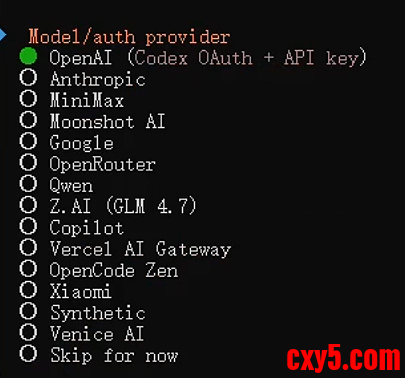
选择官网买的key自行选择;某淘买的选择最后一个 skip for now;找到在第2步自定义的模型名字,再选择配置的模型(官网买的同理)
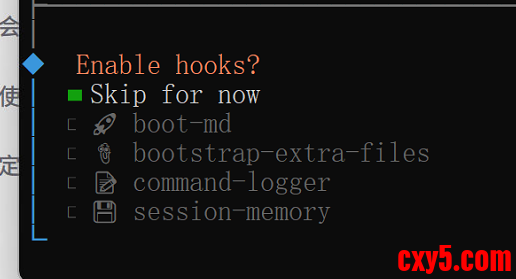
后面会有接入平台和安装技能向导,可以先跳过,多选的用空格选择跳过
这里选择 restart。新的版本最后会跳出让你选择web后台可以聊天和终端聊天或者关闭。
后面安装技能和接入平台也可以使用openclaw onboard向导来配置
关于给openclaw权限
找到你的 .openclaw 文件夹,打开 exec-approvals.json 这个文件
将“deafaults”和“agents”改成下面这样- "defaults": {
- "security": "full",
- "ask": "off"
- },
- "agents": {
- "main": {
- "security": "full"
- }
- }
来源:程序园用户自行投稿发布,如果侵权,请联系站长删除
免责声明:如果侵犯了您的权益,请联系站长,我们会及时删除侵权内容,谢谢合作! |





 提升卡
提升卡 置顶卡
置顶卡 沉默卡
沉默卡 喧嚣卡
喧嚣卡 变色卡
变色卡 千斤顶
千斤顶 照妖镜
照妖镜


